


Revit automatically adds the view name as the title when placed on a sheet, but what if you want it to be something else and not the name of the view. Lets take a closer look a Titles on Sheets.
OK, so you are familiar working with views. You have a naming convention for the view names to organise them in the project browser. But your naming convention is not very user friendly to anyone outside your organisation and you dont want it to appear on your construction documents (sheets).
Title on Sheet
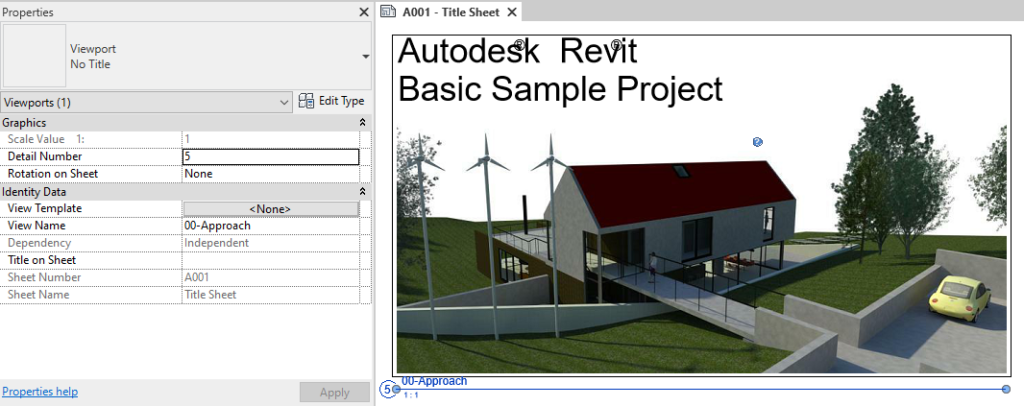
By default, if you don’t specify a title, Revit will use the View Name for the Title on sheet instead. Because of this behaviour, a lot of people just assume that the view name is the title, however this is not correct.
This behavior is a backup in the event you dont specify a Title on sheet, therefore you should really be specifying the Title on Sheet even if its the same as the view name.
Title on Sheet is a view property, simply select the view and in the Properties window scroll down to Title on Sheet and enter a value.
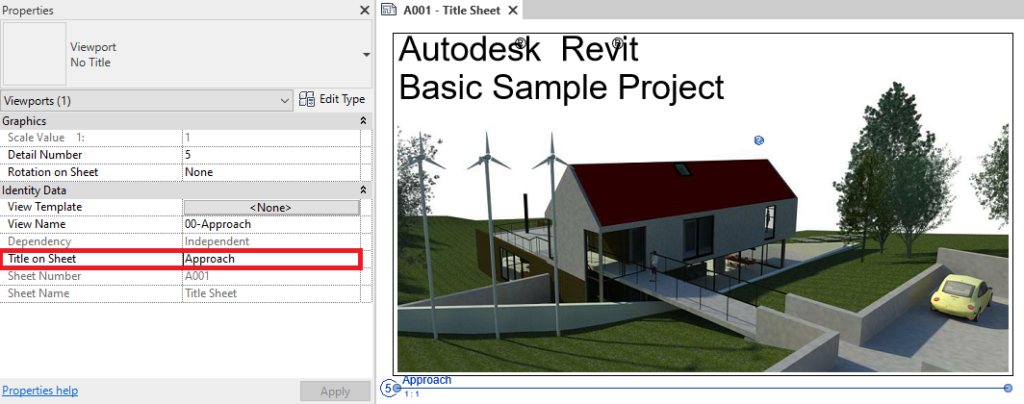
Congratulations, this is all you need to do. Now we have a more appropriate title for the view on the sheet without it effecting our view organisation or naming convention.
Still got Questions?
Book Training
Our Revit courses cover everything from the skills required to use the software, to design and share information between project teams, through to creating custom family elements.
Contact Us
We are here to ensure you receive a consistently high service and quality solutions for your business needs. We promise you won’t regret speaking to us, and if we can’t help you, we will try to find someone that can.