


Do you find it annoying when you double click out of habit and Revit keeps taking you into the Family editor. What if there was a way to stop this behaviour so that the family editor only opens when you click the Edit Family button.
Well as it happens there is an option to disable the double click in Revit.
Disable Double Click
By default double clicking on a Family in Revit will take you into the family editor… We can disable this so that it does nothing.
Heres what to do:
Go to the Revit main menu
Go to “Options”
In options on the left select “User Interface”
On the right look for the setting “Double-click Options” and click “Customise”
For Family click “Edit Family” and from the dropdown select “Do Nothing”
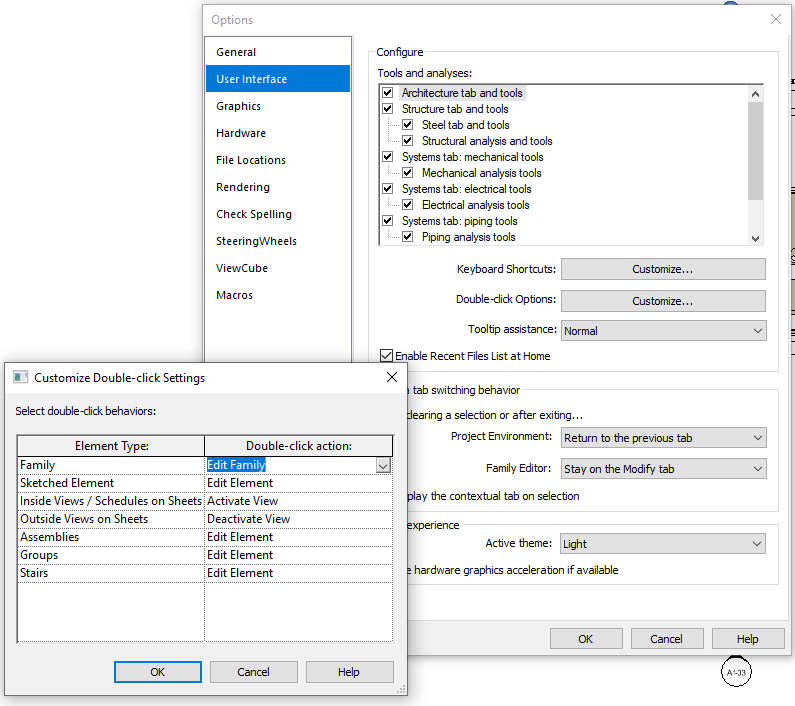
Feel free to change any of the other double click options to Do Nothing too.
Now when you accidentally double click in Revit, nothing will happen.
Still got Questions?
Book Training
Our Revit courses cover everything from the skills required to use the software, to design and share information between project teams, through to creating custom family elements.
Contact Us
We are here to ensure you receive a consistently high service and quality solutions for your business needs. We promise you won’t regret speaking to us, and if we can’t help you, we will try to find someone that can.