


Autodesk has taken a significant step forward with Revit 2027, introducing a refreshed user interface (UI) that aligns with modern design standards and evolving user expectations. Rather than a cosmetic update, these changes reflect a deeper shift toward improved usability, consistency and workflow efficiency across the Autodesk ecosystem.
One of the most noticeable changes in Autodesk Revit 2027 is the overall modernisation of the interface. Autodesk has reworked key UI components to create a cleaner, more intuitive experience. The update emphasises:
- Simplification of visual elements.
- Reduction of interface clutter.
- Consistency across Autodesk products.
Removal of the Options Bar
One of the more impactful UI changes is the removal of the traditional Options Bar. Instead, its functionality has been integrated directly into the ribbon and contextual tools. This change results in:
- A cleaner workspace.
- Fewer floating UI elements.
- More centralised control of modelling options.

By embedding options within content sensitive areas, Revit encourages a more intuitive, task-driven workflow.
Refreshed Dialog Boxes and Visual Consistency
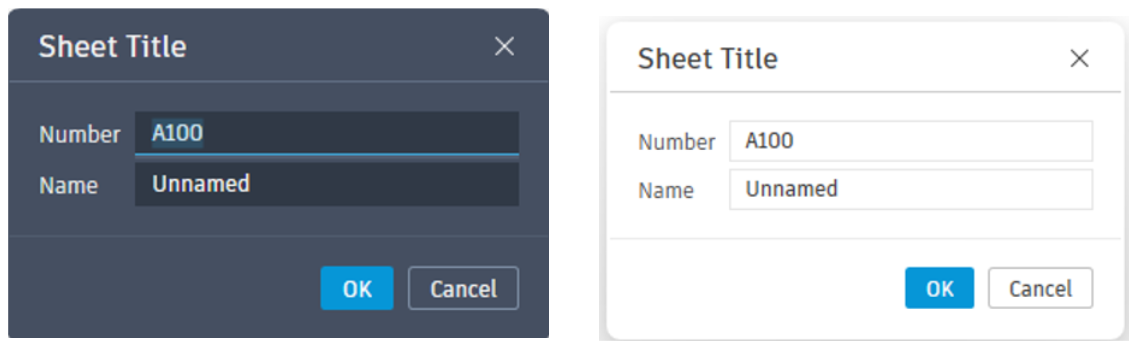
Autodesk Revit 2027 introduces updated dialog boxes with a consistent visual style across the platform. Common dialogs such as:
- Rename.
- Worksharing.
- Synchronise with Central.
- Sheet Title.
Additionally, these updates support both Light and Dark themes, ensuring flexibility for different working environments and user preferences.
Integration of AI intro the Interface
A ground-breaking addition to the UI is the Autodesk Assistant, an AI powered panel embedded directly within Revit. This feature allows users to:
- Interact with the model using natural language.
- Generate views, schedules and documentation.
- Receive contextual guidance without leaving the workspace.
Rather than navigating menus, users can now ‘ask’ Revit to perform tasks, marking a shit toward conversational interfaces in BIM software.
Performance Meets Interface: A Smoother Experience
UI improvements in Autodesk Revit 2027 are closely tied to performance upgrades:
- Accelerated Graphics enhances responsiveness when navigating models.
- Real-tile updates (eg, section box manipulation) improve visual feedback.
- A cleaner UI complements faster rendering and interaction.
The result is not just a better-looking interface, but a more fluid and responsive user experience.
The UI changes in Autodesk Revit 2027 are more than aesthetic, they directly impact productivity:
- Reduce learning curve for new users.
- Faster task execution through contextual tools.
- Improved focus with less visual clutter.
- Seamless integration with AI-driven workflows.
Autodesk Revit 2027 represents a thoughtful evolution of the user interface, balancing modernisation with practicality. By combining a cleaner design, smarter workflows and AI integration, Autodesk is redefining how users interact with BIM tools.
Still got Questions?
Book Training
Our Revit courses cover everything from the skills required to use the software, to design and share information between project teams, through to creating custom family elements.
Contact Us
We are here to ensure you receive a consistently high service and quality solutions for your business needs. We promise you won’t regret speaking to us, and if we can’t help you, we will try to find someone that can.