


Autodesk continues to refine everyday workflows in Autodesk Revit 2027, and while some updates may seem small on the surface, they deliver meaningful productivity gains. One such improvement is the Multi-Category Tag enhancements, a subtle but powerful upgrade that simplifies annotation and reduces repetitive work across projects.
In fast paced BIM environments, documentation efficiency matters. These enhancements directly address pain points around tagging consistency, flexibility and scalability.
Multi-category tags allow users to annotate multiple types of elements such as doors, windows, casework or generic models, using a single-tag family. Instead of creating and managing separate tag families for each category, you can standardise tagging using shared parameters across different elements.

A multi-category tag lets you tag all taggable elements across different categories in a single tag. It can display common parameters or shared parameters in the tag label.
- Load the multi-category tag.
- Before using it, make sure the multi-category tag is loaded into your project.
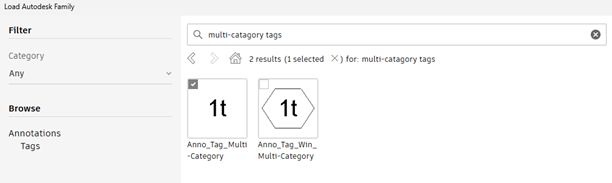
There are 2 methods to place the tag:
Method A: Tag Individual Elements:
- Go to the Annotate tab > Tag panel and click Multi-Category (tag icon).
- From the Type Selector, select the multi-category tag you loaded.
- Move your cursor over elements in the drawing area. Only components with the matching filter parameter will highlight.
- Click to place the tag.
Method B: Tag All Elements at Once
- Go to the Annotate tab > Tag panel and click Tag All.
- In the Tag All Not Tagged dialog, select the multi-category tag.
- Click ok and all eligible elements will be tagged automatically.
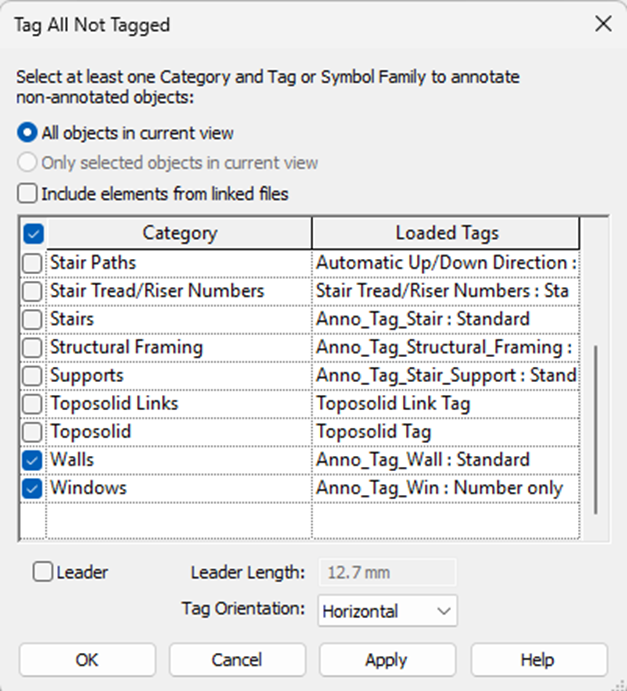
The Multi-Category Tag enhancements in Autodesk Revit 2027 are a great example of Autodesk focusing on incremental improvements that solve real user frustrations. They may not be headline grabbing features, but they:
- Reduce repetitive work.
- Improve consistency.
- Streamline documentation workflows.
For BIM managers and Revit users alike, this update is a strong step toward more efficient and standardised project delivery.
Still got Questions?
Book Training
Our Revit courses cover everything from the skills required to use the software, to design and share information between project teams, through to creating custom family elements.
Contact Us
We are here to ensure you receive a consistently high service and quality solutions for your business needs. We promise you won’t regret speaking to us, and if we can’t help you, we will try to find someone that can.