


Some Autodesk Revit improvements are immediately visible. Others are quieter but have a direct impact on the quality of project information.
Rule-based numbering for Model Elements in Autodesk Revit 2027 sits firmly in the second category. It does not change how the model looks, but it changes how consistently model information can be structures, checked and trusted.
In BIM production, numbering is rarely just a label. It supports schedules, documentation, coordination, procurement, QA reviews and downstream information management. When numbering is handled manually, especially on larger or more complex projects, inconsistencies can appear quickly; duplicated views, missing numbers, mixed naming logic and late-stage corrections.
Autodesk Revit 2027 addresses this by allowing teams to automate and standardise element numbering through rule-based templates, filters, partitions and sequences. The result is a more structure approach to a task that has traditionally depended heavily on manual discipline.
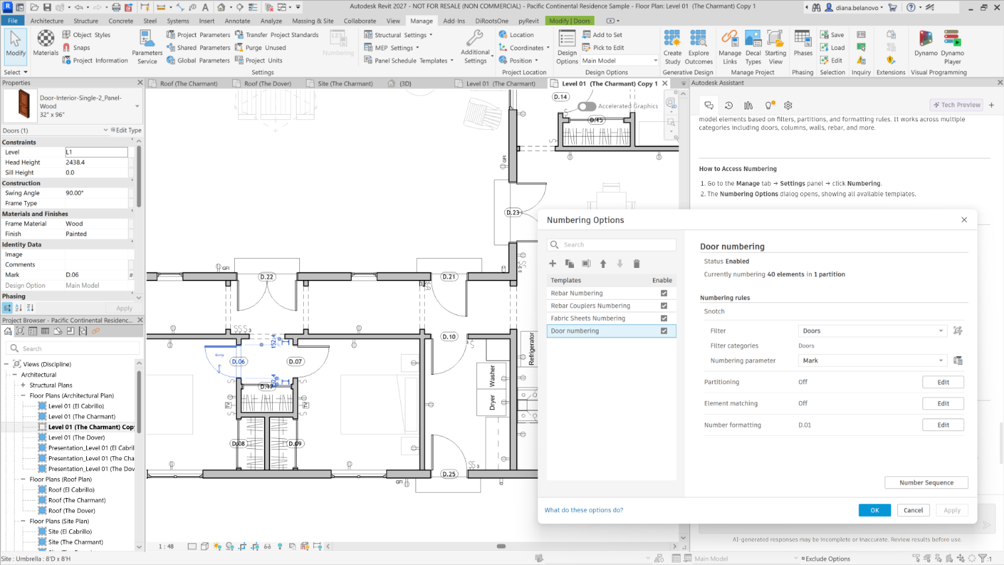
From Manual Correction to Defined Rules
The value of rule-based numbering is not simply that it saves time. Its real value it that it moves numbering from a manual correction task to a defined information rule.
Instead of editing element numbers one by one, teams can define templates that control which elements are numbered, where the generated values are stored, how sequences are organised and how the output is formatted.
That distinction matters. Manual numbering is reactive: users find inconsistencies and correct them afterwards. Rule-based numbering is more proactive: the logic is established first, then applied to the model in a controlled way.
For practices working with BIM standards, internal QA procedures or structed model deliverables, this gives numbering a clearer role in the information management process, rather than treating it as a late-stage clean-up exercise.
Templates, Filters and Parameters
At the centre of the workflow are numbering templates. These define the rules used to number a selected group of model elements.
Filters control which elements are included, while the chose numbering parameter defines where the generated value is stored. This is important because the result remains part of the model data, available for schedules, checking and coordination.
This gives teams a repeatable method for managing numbering conventions. Instead of relying on every user to apply the same logic manually, the model can follow a defined rule.
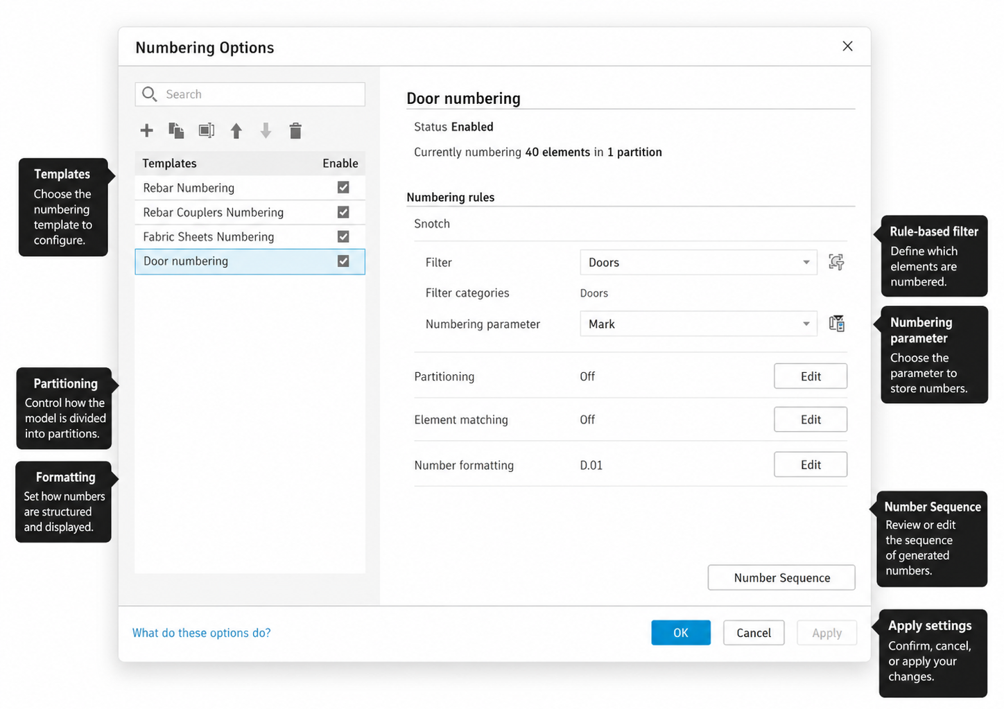
Partitions, Formatting and Sequences
Larger projects rarely follow one simple numbering sequence. Different levels, rooms, zones, packages or work areas may require different numbering logic. This is where partitions and sequences become important. They allow numbering to be organised in a way that reflects how the project is structured, rather than forcing every element into a single linear sequence.
Formatting also matters. Teams can control how numbers are displayed so that the output follows project or office conventions. That may include prefixes, suffixes, digit structure or other formatting logic depending on the required standard.
The benefit is not just automation. It is controlled automation: numbering that can be generated, reviewed, edited and aligned with how the project is actually delivered.
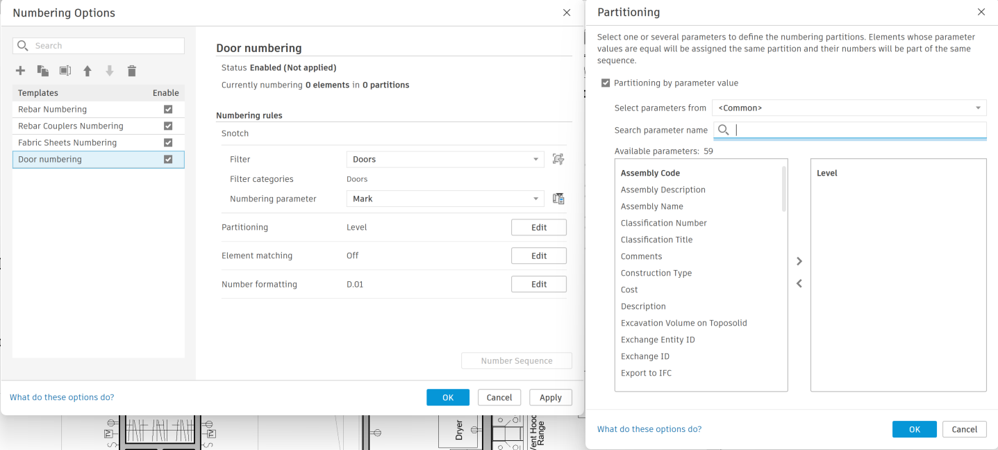
A Stronger Basis for Quality Control
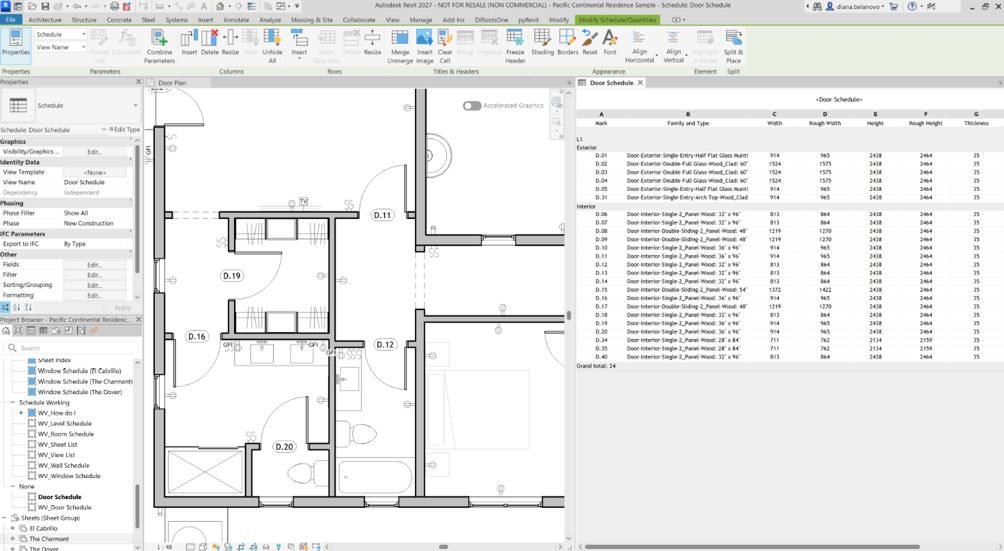
For BIM teams, the real value of this feature sits in information quality. Consistent numbering supports clearer schedules, more reliable documentation and better coordination between model data and project outputs. It also reduces the risk of inconsistencies being discovered later, when they are usually more disruptive to correct.
This is especially relevant when element numbers are used across drawings, scheduled, quantities, specifications or coordination deliverables. If the numbering logic is unreliable, confidence in the information is weakened.
By making numbering rule-bases, Autodesk Revit 2027 helps teams treat element numbers as part of the model’s information structure, not just as isolated text values.
More Discipline in Everyday BIM Delivery
Rule-based numbering may not be the most visually dramatic addition in Revit 2027, but it is one of the more practically valuable ones. It supports a more disciplines approach to BIM delivery by making element numbering more consistent, more repeatable and easier to manage at scale. It reduces repetitive checking, strengthens data consistency and helps teams trust the information they are producing.
Autodesk Revit 2027 may not make numbering glamorous, but it does make it more intelligent, structured and reliable.
Still got Questions?
Book Training
Our Revit courses cover everything from the skills required to use the software, to design and share information between project teams, through to creating custom family elements.
Contact Us
We are here to ensure you receive a consistently high service and quality solutions for your business needs. We promise you won’t regret speaking to us, and if we can’t help you, we will try to find someone that can.