


Within Autodesk Vault Professional, you can choose the ‘Copy Design’ feature which will allow you to create a new design by copying existing data with the Vault.
When opening the Copy Design browser, some users can only see the numbering scheme and the files do not show, as per the below image:
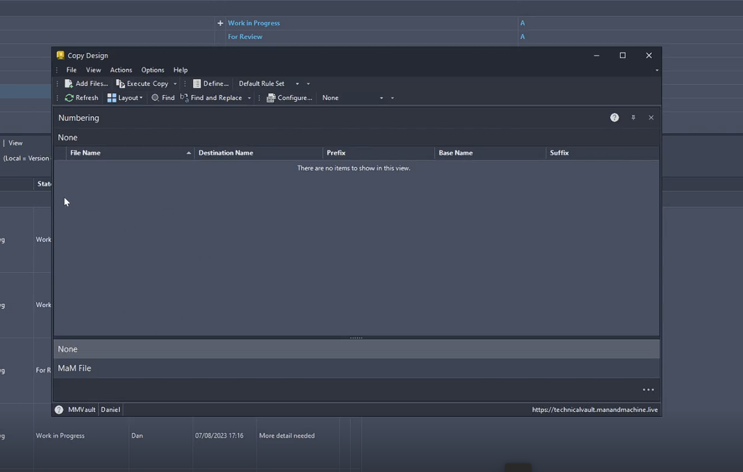
To show the files correctly, please scroll to the left of the screen and drag the cursor across to the right, to show the screen as it should show by default.
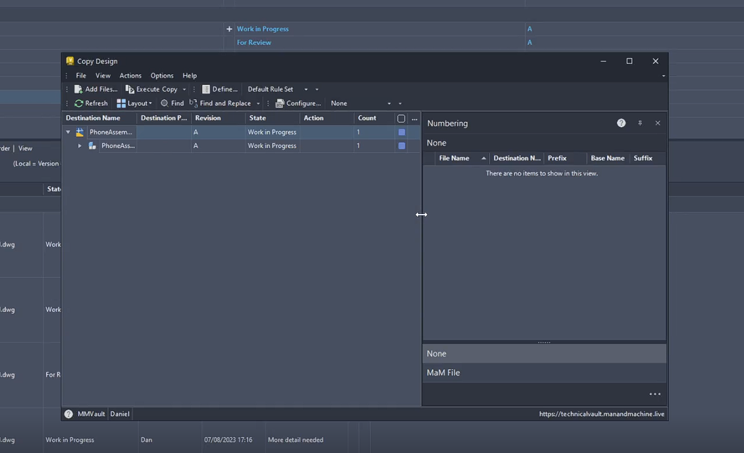
This should all now show as normal and all the files that are chosen for the Copy Design will be seen here.
Still got Questions?
Book Training
With our Autodesk Vault training you will learn to consolidate and organise all product information securely for easy reference, sharing and re-use. Make sure you contact us to find out which course is right for you.
Contact Us
We are here to ensure you receive a consistently high service and quality solutions for your business needs. We promise you won’t regret speaking to us, and if we can’t help you, we will try to find someone that can.