


Have you updated to Autodesk Revit 2027.2 and feel like the home screen is missing something? Well, you will not be missing the ‘New Revit Home’ toggle!
This feature has been available for several years, historically allowing you to switch between viewing Projects and Families together or, in the “Old” version, separately. The “New” Home also introduced additional functionality, including the ability to search and filter Recent Files, access New Feature Recommendations, and view included Forma Site Design Scenarios.
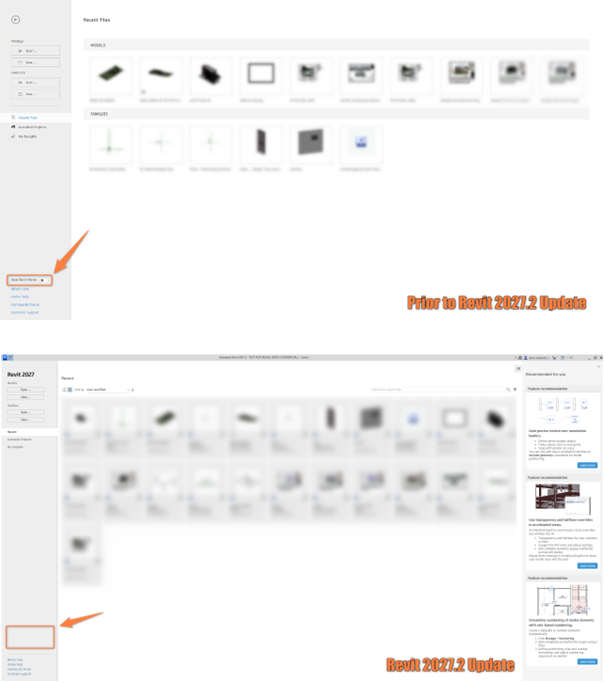
One problem you have therefore run into is that your Revit home is ‘stuck’ in whichever option you had selected before running the update. For example, you may be stuck in the ‘old’ Revit home and not have the ability to search for files on the home screen. By delving into the Revit.ini file, you can fix this by finding the ‘UseUDAHomeAsDefault’ line and changing the value to ‘1’ (on).
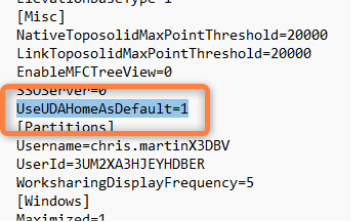
The Revit.ini file can be found by following this file path:
C:\Users\[Your Username]\AppData\Roaming\Autodesk\Revit\Autodesk Revit 2027
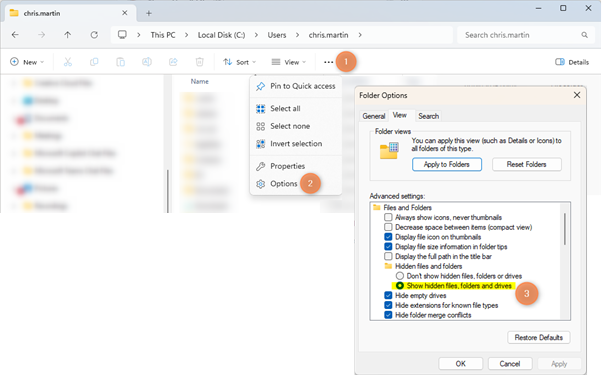
You may have to turn on Hidden Folders in your file explorer to see the AppData folder.
To revert back to the ‘old’ home from ‘new’, if you prefer the models and families to be show separately for example, then just do the reverse behaviour – set the value to ‘0’ (off).
Once this is set, you won’t have to worry about future Revit 2027 updates resetting your .ini file!
Still got Questions?
Book Training
Our Revit courses cover everything from the skills required to use the software, to design and share information between project teams, through to creating custom family elements.
Contact Us
We are here to ensure you receive a consistently high service and quality solutions for your business needs. We promise you won’t regret speaking to us, and if we can’t help you, we will try to find someone that can.