


If you work in Architecture, Engineering or Construction industries with software such as AutoCAD, Microstation and LibreCAD, you may be wondering how to go about making the move from 2D to 3D BIM-based design workflows. Maybe you are wondering whether it is right for you. Will it interrupt our current workload too much? Will the uptake within the company be positive? Will it take too lone to get everyone trained in the new software? In this blog, we will discuss the benefits of transferring from a 2D workflow to working in a 3D BIM environment with Autodesk Revit.
Why Transition to BIM? The Benefits of Working in a 3D Environment!
I have been involved in the transition from working in a 2D CAD environment using AutoCAD, to 3D using Autodesk Revit, during my time in industry at a large technology and automation business. The requirement was largely driven by the need to deliver drawing packages more efficiently as part of the wider BIM adoption process, with an adjacent move to working with global partners. Do understand though, that this is not a transition that will happen overnight, and at some times it may feel like a struggle, but one that is well worth the effort.
Many of our current customers who have transitioned from 2D CAD workflows to 3D BIM-based design have found that it:
- Enables designers to create buildings more efficiently and with more intelligence through parametric modelling, reducing design development time by 50% with an Autodesk Revit workflow vs traditional CAD tools. (Source: Lott + Barber Architects)
- Opens their business up to win more lucrative work and greater overall tender opportunities.
- Allows them to collaborate internally and externally and coordinate files using Revit/Autodesk Construction Cloud specific functionality, eg clash detection eliminates clashes at the design stage before construction begins, and allows clashes from multiple models to be organised in days instead of weeks. (Source: Elgaard Architecture)
- Offers direct, built-in functionality and extensions to quickly generate life-like visualisation using rendering tools such as TwinMotion and Enscape, with VR support for a truly immersive experience.
- Offers flexibility and broad interoperability between different software, with the ability to open, link and export files in open, non-proprietary standards such as IFC conforming to the ‘OpenBIM’ approach. Find our more about OpenBIM at buildingSMART.
A Hybrid Approach to Design
Moving to Autodesk Revit doesn’t have to be disruptive. Start by linking CAD files into Revit as underlays. This hybrid approach allows teams to adapt without halting ongoing projects. Over time, you can phase out 2S workflows withing your organisation and fully embrace BIM.
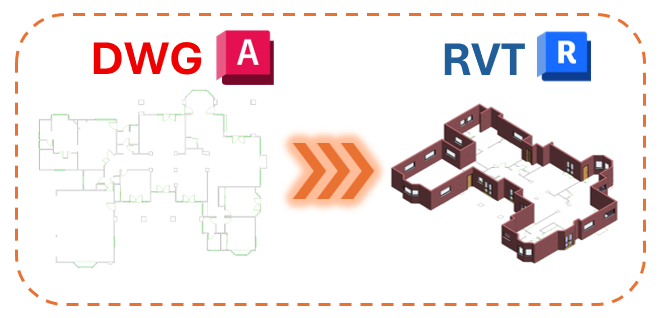
3D elements such as wall can easily be drawn from a DWG by using the ‘Pick Lines’ option in Autodesk Revit.
There will likely always be a requirement to link in some external 2D CAD files, particularly if you are working on a large project with lots of different disciplines/contractors who may not have yet moved to a 3D environment.
Once you are working in Revit more regularly, linking in files from other disciplines, you can make use of some of the functionality from Revit > Revit coordination, such as clash detection, coordinates management and copy/monitor, which allows you to copy elements automatically from linked files, and also monitor linked files for any chances relative to associated elements in your file.
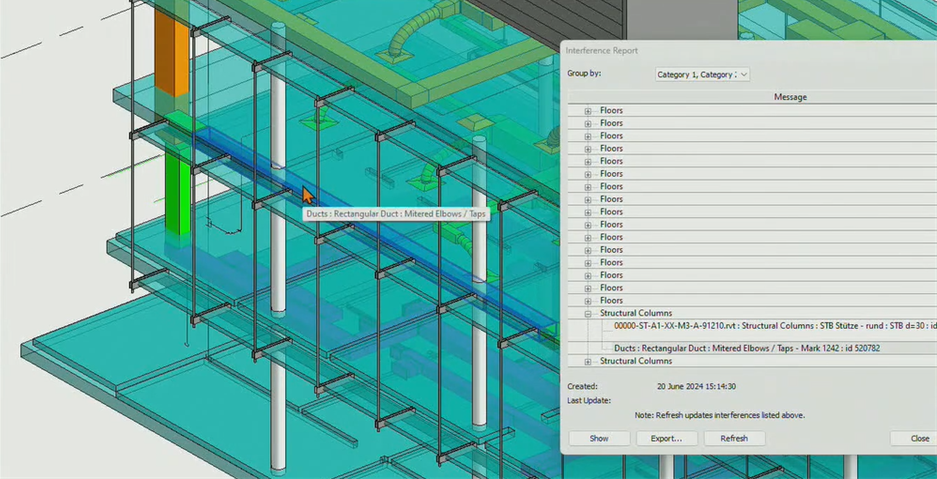
Interference Check allows for built-in Clash Detection within Autodesk Revit. Expand this capability with Model Coordination in the Autodesk Construction Cloud.
Project Deadlines while Building Capability
Do not try to migrate all projects over to Revit. Any ongoing projects should remain in their current software and workflow. A Revit pilot project should be identified – this should be a new project that is low-risk, and there should be a general understanding that undertaking a new workflow will cause a certain level of disruption and potential delay in the developmental stages.
Utilise a CDE and Track Projects
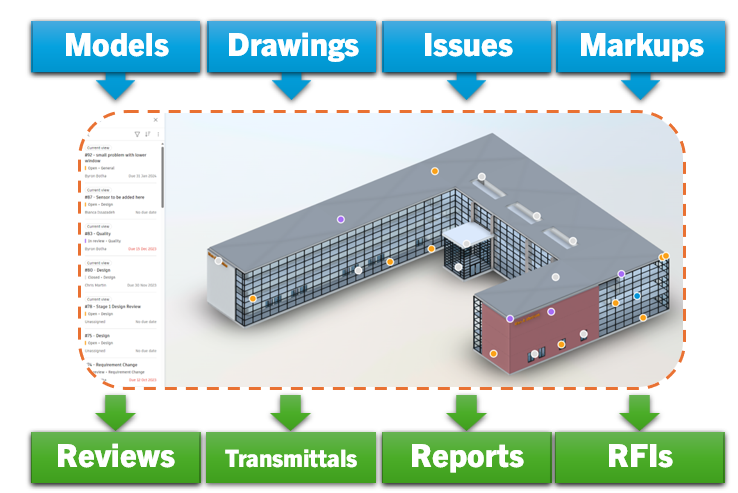
Whether you are visualising progress via a “Kanban board” or on a Common Data Environment (CDE) such as Autodesk Construction Cloud (ACC), managing your data correctly is imperative to ensuring that your BIM projects are a success. ACC offers advanced file management, collaborative tools and project timeline tracking features, amongst many others. Man & Machine can assist in integrating this CDE into your design workflows, whether that is a simple file management implementation using Autodesk Docs, or a full construction workflow management platform, from Design to Build and Operation. For more information about getting started with your ACC deployment, please click here.
Appoint a BIM Champion and Establish Revit Standards
Ideally this would be someone with BIM and/or Revit integration experience. This person does not necessarily have to be management, just a technical user, who can act as a liaison between the project teams (to assist with Revit adoption) and IT (who can assist with licensing/associated CDE setup, where required).
This user would likely be responsible for setting up initial Revit standards – these will evolve over time, as the standards are put into practice with live projects. Set standards early on for file naming, family content libraries and worksets (if using). Define a Project Template to ensure everyone is working to the same base-level standard within a project – Project Templates can include a number of settings such as standardising views with ‘View Templates’, drawing sheets, object styles and ‘Shared Parameters’, among others.
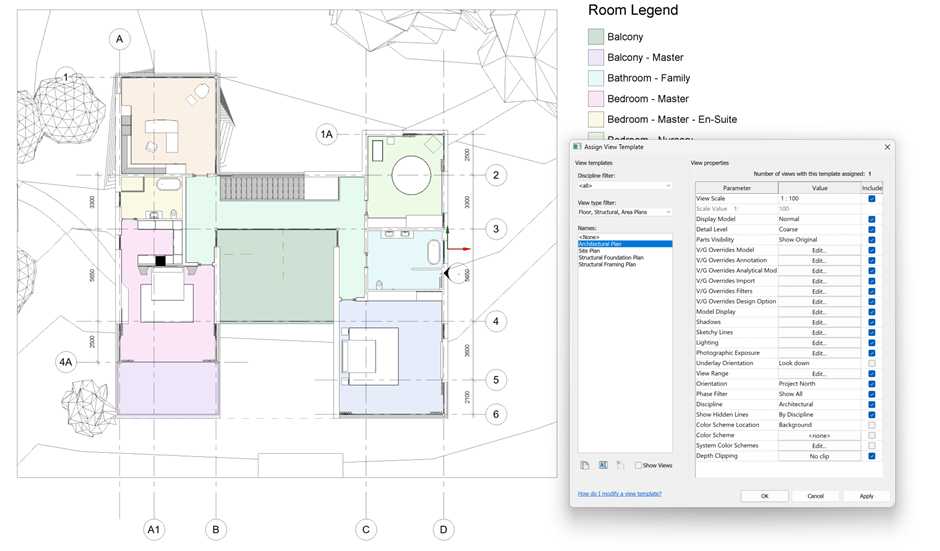
View Templates built-in to a Project Template allows users to quickly standardise common drawing overrides such as graphics and visibilities.
Measure Success with KPIs – Don’t Expect Perfection
Metrics should be used to validate and verify improvements against your current workflow. Going forward, this could then expand into monitoring improvements against your initial Revit pilot project. You may wish to track things like rework hours, design issues and RFIs, the latter two of which can be recorded using a CDE such as Autodesk Construction Cloud.
There should be a general understanding within the company that mistakes are expected as users are learning, and users be supported with the adoption journey beyond the initial Revit training. If new users are given as much opportunity as possible to become comfortable using Revit and supported to develop their skills, this will dramatically increase the success of the transition.
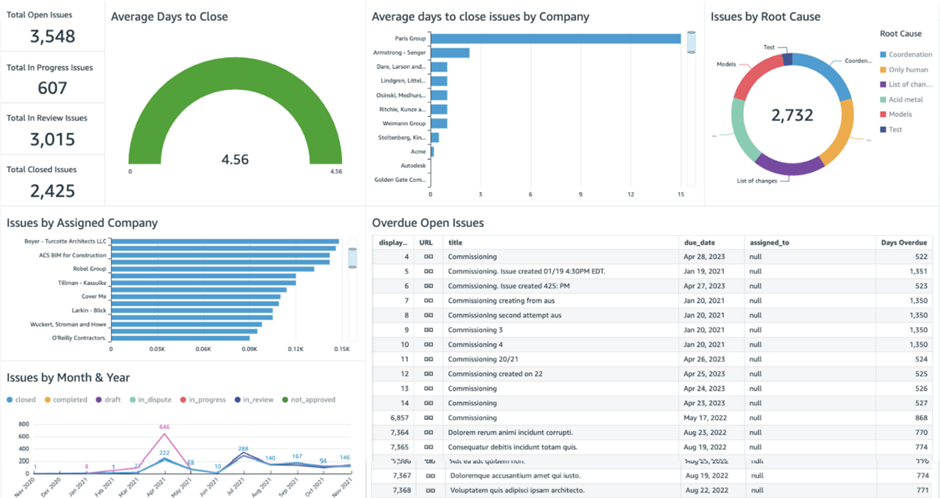
Autodesk Insight can be used to help leverage project data and monitor performance.
Common Objections
- ‘All our users have many years or experience in 2D CAD and are anxious about learning new software and processes.’
- As with any move to a new piece of software, there is a fairly steep initial learning curve which levels off quite quickly once you are up-and-running and using Revit regularly. Whether you are an Architect, Structural Engineer, MEP Engineer or somewhere in between, we can hopefully ease the transition of moving from AutoCAD to Revit with one of our Revit Fundamentals training offerings.
- ‘We don’t have the time to do training – we have too many ongoing projects.’
- Training is always going to be a bit of a commitment – but is the first step to working in a more efficient 3D BIM workflow. Many companies tendering for work are finding that more and more Clients/Owners are stipulating for Revit to be the primary software – having the necessary experience can help you win more valuable work. An initial investment of 3 days Fundamentals training may be enough to get going in a project, and will ultimately save time compared to a traditional drafting workflow – one company working in Structures/MEP found that Revit saved 76% on design hours vs AutoCAD.
- ‘Our current process collaborating in AutoCAD using Xrefs works just fine.’
- Collaborating in Revit is ideal for multidisciplinary BIM projects, even if you are only a smaller cog in the wheel. Xrefs do ease the process of coordinating multiple DWG files in AutoCAD, allowing for layer control and snapping to the objects within. However, linking files in Revit unlocks this and more, including collaborative functionality such as Copy/Monitor, Shared Coordinates and Worksharing.
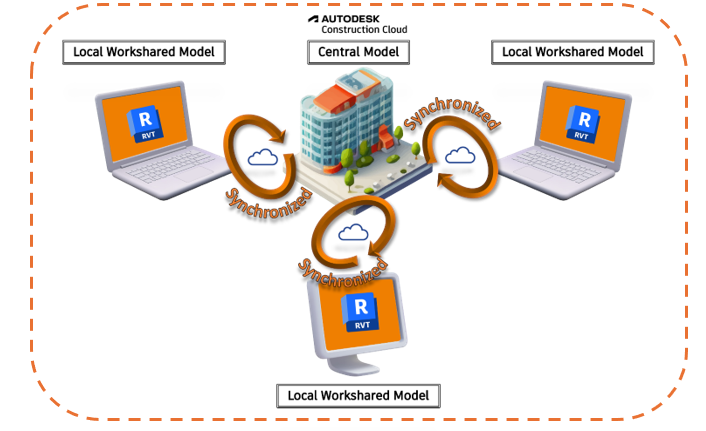
The standard working process when working with a centralised cloud model using Autodesk BIM Collaborate Pro.
- ‘We have hundreds of CAD blocks/cells. This would take ages to transfer to Revit!’
- The DWG files can be imported into Revit – converting them to 3D Revit Families with parametric intelligence (think dynamic blocks but better!) doesn’t take as long as you think. For more information about our Revit Families course, click here (though we would always recommend doing a Revit Fundamentals course first if you are starting to use Revit for the first time!). Depending on your discipline, Revit has a wide collection of built-in “system” families that you can use to create standard architectural and structural elements, as well as MEP systems, out-of-the-box. Furthermore, there is an Autodesk cloud library which is freely accessible within the software, and third-party online libraries, which many manufacturers use to host their 3D Revit content.
In conclusion, whilst AutoCAD will always have its place as a multi-disciplinary CAD drafting software, particularly for Civil Engineers (Civil 3D) and Plant Engineers (Plant 3D), there are powerful benefits for Architects, Structural and MEP Engineers to author BIM designs within Revit.
Still got Questions?
Book Training
Our Revit courses cover everything from the skills required to use the software, to design and share information between project teams, through to creating custom family elements.
Contact Us
We are here to ensure you receive a consistently high service and quality solutions for your business needs. We promise you won’t regret speaking to us, and if we can’t help you, we will try to find someone that can.