


Despite rapid advances in digital tools, many design teams still struggle with utilising workflows to gain real project efficiency. As projects grow in complexity and timelines tighten, with companies increasingly under pressure to do “more with less”, traditional design processes used in Architecture, Engineering and Construction (AEC) are increasingly exposed as inefficient and risky.
Model-driven design and automation offer a smarter alternative—one that replaces repetitive tasks with real-time coordination and reliable data. Let’s explore where traditional methods often fall short, how automated models streamline delivery, and what best practices can help teams unlock real productivity gains.
Manual Drawing Updates
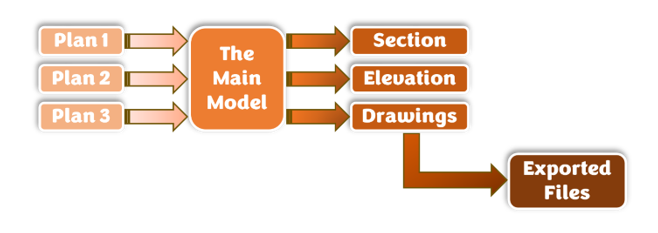
In traditional design workflows, drawings often exist as disconnected outputs. Plans, sections, elevations, and schedules are manually coordinated, meaning a change in one view triggers a cascade of updates elsewhere.
The Result?
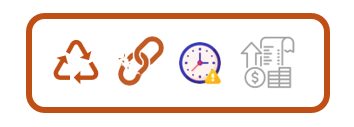
- Rework – small design changes can require hours of manual redrafting across multiple views.
- Inconsistencies – missed updates lead to conflicting information between drawings, increasing the risk of errors onsite.
- Wated hours – managing updates becomes a heavy time burden that causes time to be lost that could be better used to solve important design issues.
- Rising project costs – rework, RFIs and last minute changes all translate to budget overruns that have a ripple effect on timelines.
This is where utilising a Building Information Modelling (BIM) software, such as Autodesk Revit, comes into play!
The Power of Revit as a ‘BIM’ Modelling Software
Autodesk Revit’s power lies in the fact that plans, sections, elevations, and schedules are all live representations of the same model data. Parametric modelling within Revit helps to ensure that information is maintained consistently across the central model – it is the same information, just represented in different forms. When used correctly:
- A wall moved in plan updates all related sections and elevations automatically.
- A level change updates hosted elements and associated views.
- Door, window, and room schedules recalculate instantly based on model parameters.
- Tags pull data directly from elements rather than relying on manual text.
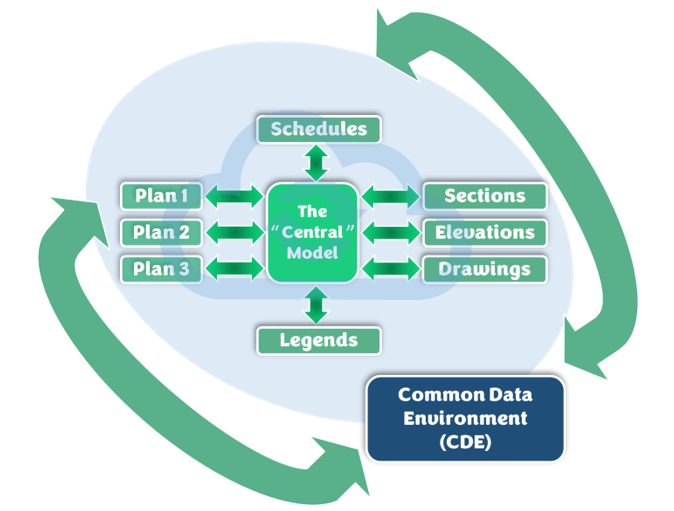
This bi-directional relationship means Revit users can focus on authoring the model once instead of redrawing information repeatedly. The more consistently elements are modelled and parameterised, the more reliable these automated updates become.
Revit Best Practices that Improve Productivity
For users already working with Revit and looking to really accelerate productivity, follow these tips to get started:
- The Power of a Strong Project Template: A good Revit project template (.RTE file) eliminates guesswork and enforces consistency. Technical users should ensure templates include:
- Predefined view types and view templates
- Correct object styles and line weights
- Standardised drawing sheets
- Standardised worksets (when using BIM Collaborate Pro)
- Shared parameters already embedded

- Use High-Quality, Purpose-Built Features: Not all Revit Families are created equal. Poorly built content leads to slow models, broken schedules, and unreliable drawings. Best practice includes:
- Limiting unnecessary geometry and nested families
- Using parameters instead of modelled variations
- Aligning levels of detail with project stage
- Following consistent naming conventions

- Implement Shared Parameters Early: Shared parameters are essential for schedules, tags, and cross-project consistency. They enable:
- Reliable Scheduling
- Consistent data across multiple models
- Easier coordination with cost planning and asset data
- Cleaner exports for IFC or COBie workflows

- Lets Views do the Work: Rather than duplicating views and manually adjusting graphics:
- Use View Templates to control visibility and annotation
- Rely on Filters to drive graphical consistency
- Use Dependent Views (e.g. Duplicate as Dependant) for large floor plans

Learning Revit the Right Way
For technical users learning Revit, the goal should not be to “make the drawings look right,” but to build a clean, well-structured model that produces correct drawings automatically. When model automation is fully leveraged:
- Coordination time drops significantly
- Errors caused by manual updates are reduced
- Design changes become manageable instead of disruptive
- Teams spend more time solving design problems, not fixing documentation
Revit is most efficient when it is treated as a data-driven modelling platform—not a digital drafting board. By moving away from manual drawing coordination and embracing model automation, real-time updates, and strong modelling standards, design teams can reduce rework, improve accuracy, and deliver projects more efficiently.
Still got Questions?
Book Training
Our Revit courses cover everything from the skills required to use the software, to design and share information between project teams, through to creating custom family elements.
Contact Us
We are here to ensure you receive a consistently high service and quality solutions for your business needs. We promise you won’t regret speaking to us, and if we can’t help you, we will try to find someone that can.