


In modern building design, creating an efficient route for people to move through a building is an important part of architectural planning. Whether it is an emergency evacuation path, a circulation route, or a pathway through a complex building, designers need to understand how people can move safely and efficiently from one location to another.
Route Analysis is a feature in Autodesk Revit that helps architects and designers study and evaluate movement through a building. By analysing possible paths between locations, designers can identify inefficient layouts, obstacles, and potential circulation problems earlier in the design process.
Instead of evaluating circulation only by looking at a floor plan, designers can use route analysis to understand how a person can move from one point to another.
For example, a designer might need to determine:
- How people can travel from an office to an exit.
- The shortest path between two rooms.
- Whether furniture or partitions create circulation problems.
- How efficiently occupants can move through a floor.
- How the layout affects pedestrian movement.
The path of travel does not calculate along vertical distances, the path of travel must be all on one level.
Let’s have a look at how this works.
- Open a plan view.
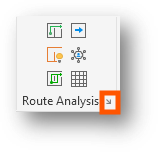
- Go to the Analyze tab > Route Analysis panel > select settings.

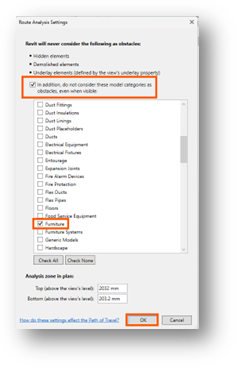
- For the purposes of this example for you to see this working, select the check box for In addition and then select the check box for furniture and walls.
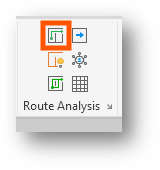
- Select Path of Travel.
- Check a start point and an end point from one point of the building to another, as shown in the below image.
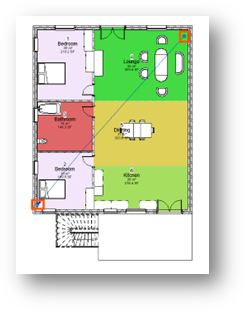
- When you place a path of travel, nothing happens. Now go back to the settings and deselect the check box for in addition. Select the path of travel and click update on the ribbon.
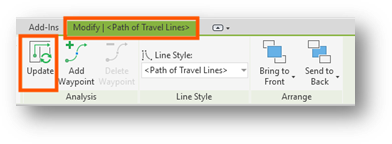
Notice how this has changed the path of travel calculation.
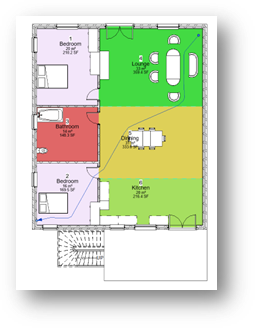
And that’s how we start to use Route Analysis within Autodesk Revit.
Still got Questions?
Book Training
Our Revit courses cover everything from the skills required to use the software, to design and share information between project teams, through to creating custom family elements.
Contact Us
We are here to ensure you receive a consistently high service and quality solutions for your business needs. We promise you won’t regret speaking to us, and if we can’t help you, we will try to find someone that can.