


The 2027 release of Autodesk Revit introduces a series of practical, yet impactful improvements aimed at refining documentation workflows. Among these, Tag Leader Enhancements stand out as a subtle but powerful upgrade, addressing long-standing usability limitations and giving designers far greater control over annotation clarity.
Why Tag Leaders Matter
In Building Information Modelling (BIM), tags are essential for communicating data about elements such as walls, doors, and systems. Tag Leaders, the lines connecting tags to elements, play a crucial role in ensuring drawings remain readable and professional.
Before 2027, users often struggled with limited control over these leaders. Misaligned endpoints, awkward placements, and inconsistent layouts could clutter drawings and reduce documentation quality. The 2027 enhancements directly target these issues, making annotation more precise and flexible.
What’s New in 2027
1 – Full Control Over Leader Start and End Points.
One of the most significant updates is the ability to independently control both the start and end points of tag leaders. Users can now manually position these points instead of relying on automatic placement. This improvement allows:
- Cleaner annotation layouts.
- Better avoidance of overlapping elements.
- Greater customisation for complex drawings.
According to Autodesk documentation, both points can now be set freely and positioned with precisions, offering a level of flexibility that was previously unavailable.
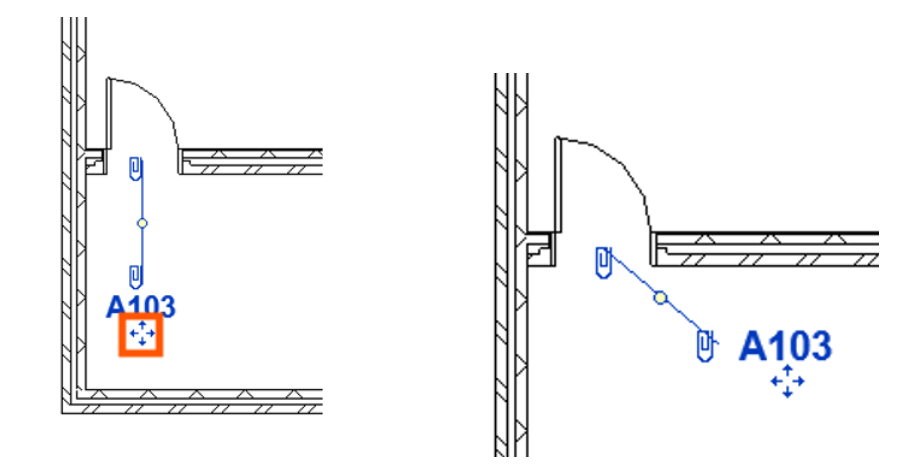
2 – Leader Endpoint Snapping
Autodesk Revit 2027 introduces snapping functionality for leader endpoints. Users can anchor the leader directly to specific geometry, such as edges, faces, or reference points. Benefits include:
- Improved accuracy in tag placement.
- Stronger visual association between tags and elements.
- Reduced ambiguity in construction documents.
This snapping capability ensures that annotations are not only visually aligned but also contextually meaningful.
3 – Adjustable Leader Elbows and Alignment
Another key enhancement is the ability to align leader elbows across multiple tags. Users can now standardise the angle and alignment of leader bends, creating a consistent visual structure. This leads to:
- More professional looking documentation.
- Easier readability for stakeholders.
- Faster clean-up of annotation heavy views.
Additionally, aligning elbows across tags help maintain uniformity in large-scale drawings where multiple annotations are present.
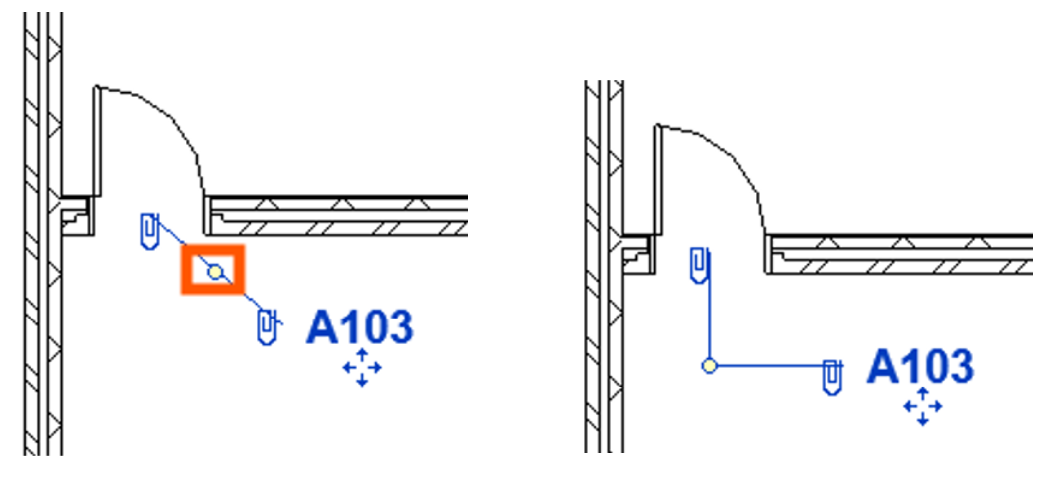
4 – Manual Editing with Clip Controls
A new interactive control (often referred to as a ‘clip’ handle) allows users to directly manipulate leader geometry in the workspace. This intuitive interface reduced the need for trial and error adjustments. Designers can:
- Drag endpoints visually.
- Fine-tune leader positioning in real time.
- Quickly iterate without opening multiple dialogs.
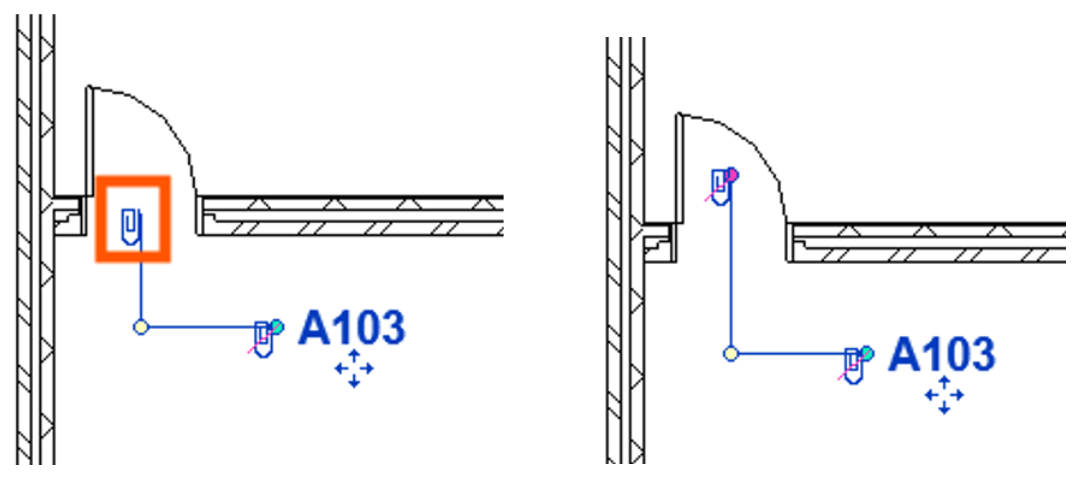
5 – Improved Consistency Across Tag Types
Previously, not all tag categories behaved the same way when it came to leader control. In 2027, Autodesk has standardised many of these behaviours, ensuring a more consistent experience across different tag families. However, it’s worth noting that some limitations still exist, particularly when certain generic annotation families, where full control is not yet implemented.
Tag Leader Enhancements in Autodesk Revit 2027 demonstrate how targeted usability improvements can significantly elevate the user experience, by giving designers precise control over annotation behaviour.
While not as headline grabbing as AI features, these changes deliver immediate, practical value, making drawings cleaner, workflows smoother and communication more effective.
Still got Questions?
Book Training
Our Revit courses cover everything from the skills required to use the software, to design and share information between project teams, through to creating custom family elements.
Contact Us
We are here to ensure you receive a consistently high service and quality solutions for your business needs. We promise you won’t regret speaking to us, and if we can’t help you, we will try to find someone that can.