


Navisworks is an amazing application for bein able to federate lots of different models into one project such as plumbing and piping, ventilation, structural and architectural. However different disciplines and different countries may use different units and may need to work to different decimal places.
Navisworks is no exception and allows you to choose the units you’d like to use regardless of what the native application uses.
How to set the Display Units
Step by Step Guide
Changing the display units is a Navisworks-wide setting so should only need to be set once, however, if you need to switch units for different projects, you may need to return here and set the units again.
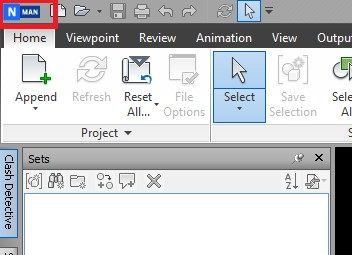
Step 1
Open the Main Menu
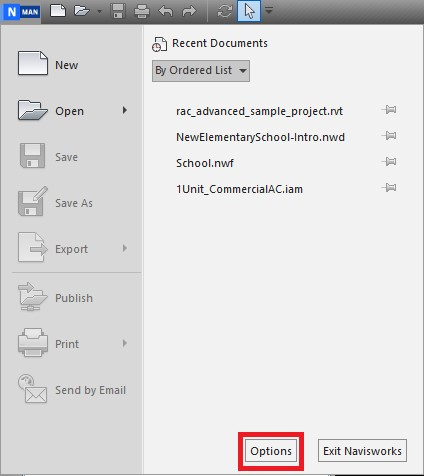
Step 2
Click Options
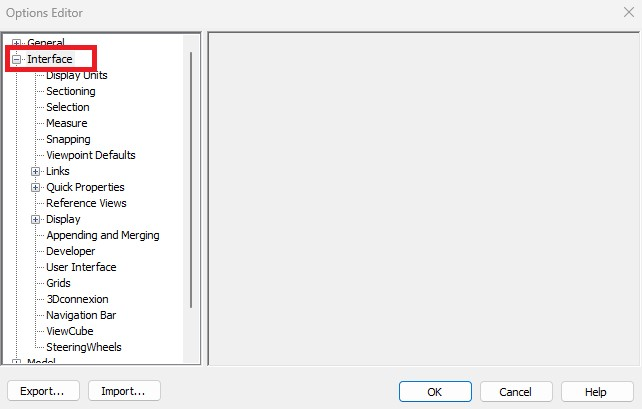
Step 3
Expand interface, then select Display Units
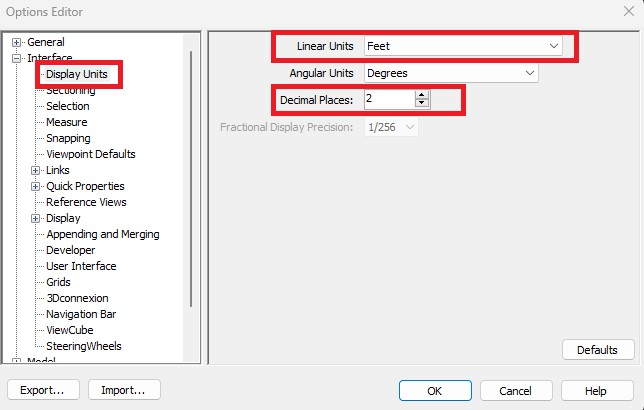
Step 4
Change Linear Units and Decimal Places
And it’s as simple as that, you shouldn’t need to change this again. If you have customised your options such as the above, there is also an Export and Import button at the bottom so you can save your settings should you wish. This is useful for standardising the settings within your team/organisation and as a backup should you need to reinstall Navisworks.
Still got Questions?
Book Training
Our Navisworks courses cover both the essentials of Navisworks and how to use it within a BIM workflow. It will help you to perform visual coordination, clash detection and design review workflows.
Contact Us
We are here to ensure you receive a consistently high service and quality solutions for your business needs. We promise you won’t regret speaking to us, and if we can’t help you, we will try to find someone that can.