


In Revit you can apply a material to a surface such as paint onto a wall or carpet onto a floor.
Applying Paint
The Paint Tool allows you to apply any material you have loaded into the project so you will firstly want to make sure you have the material loaded into your project
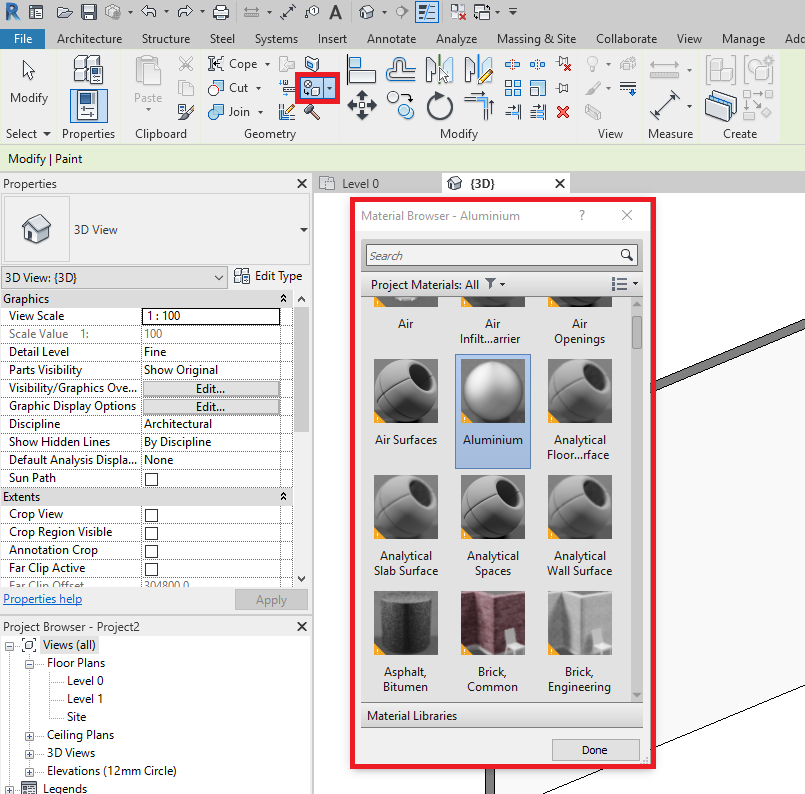
- Go to the Modify tab in the ribbon bar.
- Select the Paint button from the Geometry Grouping.
- After pressing Paint the material browser will appear with a list of all your materials.
- Select a material and click on the surface, this will apply the material to that surface.
Conclusion
The paint tool is really useful for applying materials to surfaces without the need for editing the structure of walls and floors and having to create a layer.
Still got Questions?
Book Training
Our Revit courses cover everything from the skills required to use the software, to design and share information between project teams, through to creating custom family elements.
Contact Us
We are here to ensure you receive a consistently high service and quality solutions for your business needs. We promise you won’t regret speaking to us, and if we can’t help you, we will try to find someone that can.