


When managing a large team, there may be occasions where you need to assign Autodesk products to hundreds or even thousands of users. While it’s possible to add users individually, doing so manually can quickly become a time-consuming and repetitive task. Fortunately, the Autodesk Management Portal allows you to bulk import users using a CSV file, making the process much faster and more efficient.
To get started, open your preferred spreadsheet editor, such a Microsoft Excel or Google Sheets, and create a new spreadsheet. The first row of the CSV file is treated as a header row and is ignored during the import process. Instead, it simply identifies the information required in each column. These columns should contain the user’s First Name, Last Name and Email Address. There is also an optional Sub ID column, which can be used if you want to assign users to a specific subscription during the import.
Once you’ve entered all your users’ details, save the spreadsheet as a CSV (.csv) file. It’s worth noting that each CSV file can contain a maximum of 5,000 users, so if you’re importing a larger number of users, you’ll need to split them across multiple files.
With your CSV file ready, return to the Autodesk Management Portal and choose the option to upload your saved file. The time taken to process the import will depend on the number of users being added. Smaller files may complete in just a few seconds, while larger imports could take several minutes.
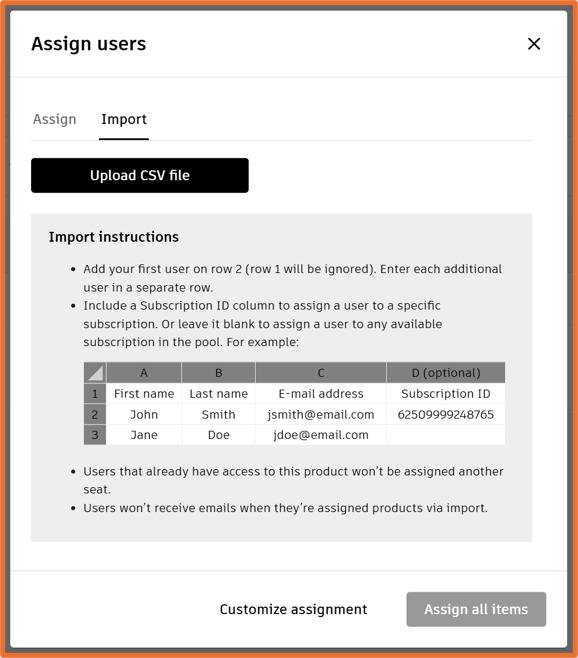
After the upload has finished processing, Autodesk will validate the information in your CSV file. If any issues are detected, such as missing information or incorrectly formatted email addresses, you’ll be able to download an error log highlighting which users could not be processed and why. This allows you to quickly make any necessary corrections before attempting the import again.
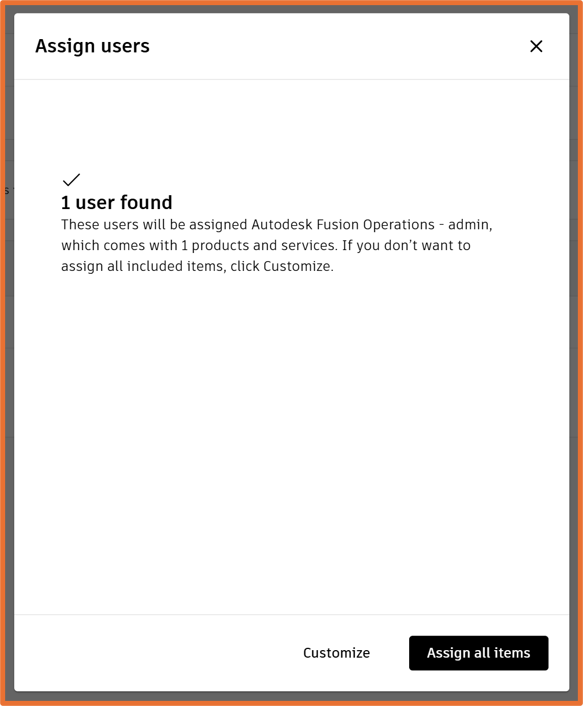
If no errors are found, you’ll be prompted to confirm the user assignments before they’re applied. Any users who don’t already exist within your Autodesk team will automatically be added, allowing you to both create new users and assign products in a single, streamlined process. This makes bulk imports an excellent way to onboard new employees or manage license assignments across larger organisations.
Still got Questions?
Buy Software
Autodesk is a global leader in software for architects, builders, engineers, designers, manufacturers, 3D artists and production teams. Contact us now to find out which software is right for you.
Contact Us
We are here to ensure you receive a consistently high service and quality solutions for your business needs. We promise you won’t regret speaking to us, and if we can’t help you, we will try to find someone that can.