


While tracking movements and levels isn’t a functional requirement of Fusion operations, it is a core element in any manufacturing process. Whether is it ordering materials for production, receiving or storing inventory and finally consuming them in production, Fusion Operations supports the tracking of Inventory throughout the entire managed life.
Inventory Overview
Inventory can transition through various workflows before and after production. Fusion Operations creates the framework for these workflows which allows them to be as flexible as needed for each company using them.

This can start at either the Material Requirements of a production order, or the creation of a purchase order, with material requirements able to create purchase orders. Once a purchase order is created, the inventory can be received.
Once the material has been received, it can be sent to a designated storage location or held in a staging area, ready for production.

After production, stock can either be sent straight our or back to storage awaiting shipping.
Throughout this process, Fusion Operations is tracking the Inventory movements and stock levels of customisable warehouses and warehouse locations. This can be reported based on products, production orders, shipments or a range of other filters.
Material Receiving
Inventory can be received through either the Administration or Shopfloor interface. This will contain information such as the Purchase Order or products, the Quantity, any Lot Numbers for traceability, then the warehouse Location the material will be stored.

Material Staging
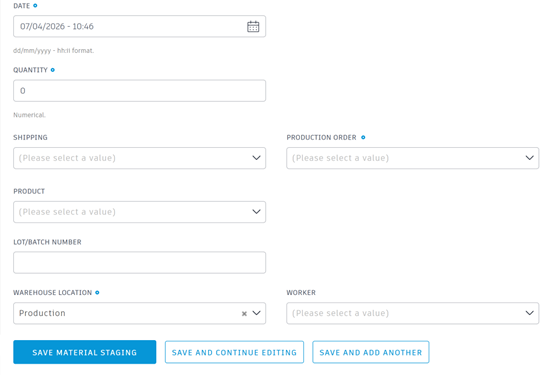
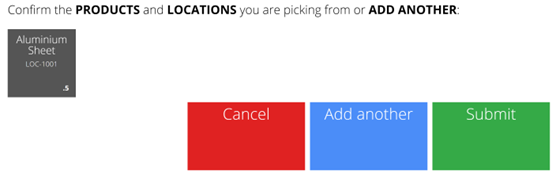
Before material is used in a production run, it can be staged to reserve the inventory allocation. This can be completed in either the Administration or Shopfloor interface. Once the material has been staged, it can be consumed directly by the production operation.
The data input during a Material Staging includes the Production Order, the Product, Quantity, Lot Number, and Warehouse location the material was sourced from.
Inventory Movement
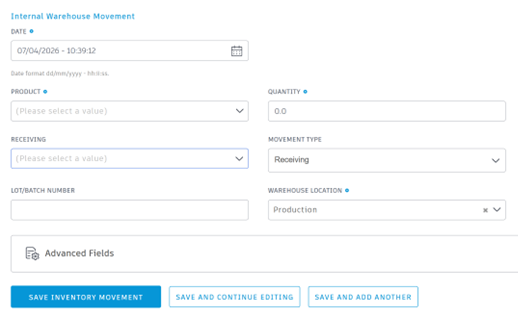
In addition to the external movements of receiving and shipping, the internal movements are also tracked in Fusion Operations. This supports any movements between any two internal locations, whether stock needs rearranging or moving between warehouses for the use by other departments. This is possible in either the Administration interface or Shopfloor, depending on access.
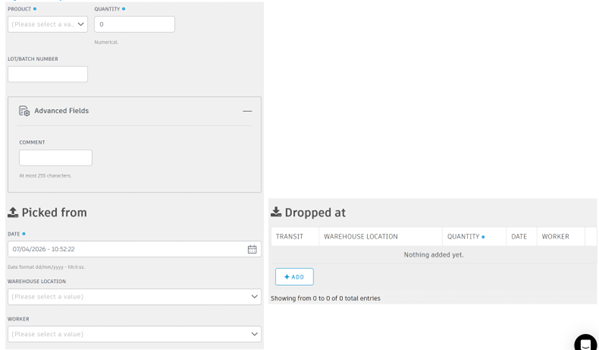
The Inventory Movement area tracks every movement of material through the premises. Each movement is timestamped and can identify the workers involved in the movement.
Reporting
With Fusion Operations tracking all this data in the background, it provides us with the ability to not only obtain live data, but report on previous movements. This includes viewing current stock numbers and generating external reports for 3rd Business Intelligence software.
Inventory View
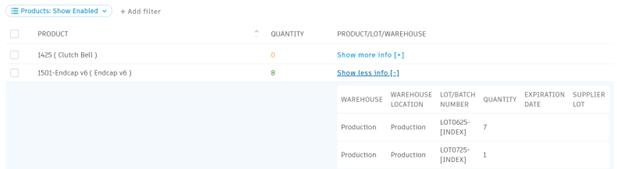
The Inventory View in Fusion Operations will give a live breakdown of stock numbers, including warehouse locations and lot numbers.
WIP Inventory
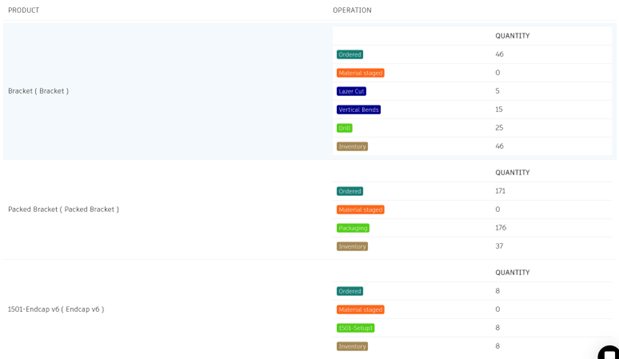
The WIP Inventory view gives an overview of each product and the current state of the products.
For production parts, this includes a quantity count for ordered parts, a breakdown of the number of parts at each operation phase, and a count of those in Inventory.
For raw material, this shows how many are in Inventory, Material Staging and the products which have consumed them.
Inventory Reports
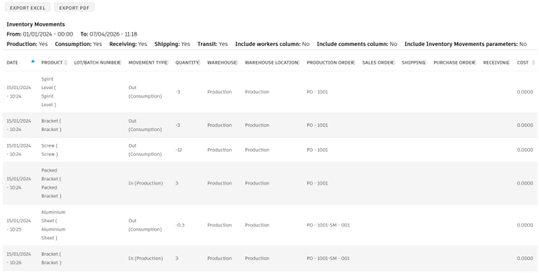
There are two reports that can be generated regarding Inventory depending on the type of reporting required at the time; Inventor Movements or Inventory Valuation. These can be exported for viewing in either PDF or Excel.
Inventory Movements can be filtered based on Products, Workers, Warehouse, Lots, Purchase Orders and various other properties. Once generated, this will show all the relevant movements as seen in the Inventory view.
The Inventor Valuation will provide a lice representation of the current Inventory levels, paired with the unit price of each product. This creates a live estimation of the stock valuation.
This functionality requires that each product is assigned the correct unit price at the time of reporting.

Still got Questions?
Book Training
Through hands-on exercises, you will acquire the key skills and knowledge required to design models using Fusion. It will teach you everything from product development to simulation and fabrication.
Contact Us
We are here to ensure you receive a consistently high service and quality solutions for your business needs. We promise you won’t regret speaking to us, and if we can’t help you, we will try to find someone that can.