


Documentation is where great designs become manufacturable products, and with Autodesk Inventor 2027, the drawing environment has received meaningful upgrades that focus on clarity, control and real-world data integration.
This release is all about helping engineers product cleaner drawings faster whilst also bringing richer information directly into documentation workflows.
Here are the key highlights:
- Enhanced Drawing Views for Better Clarity: Drawing views in Inventor 2027 are more responsive and refined, making it easier to generate and manage complex views from large assemblies and parts. Improved stability and performance help reduce delays when updating drawings.
- Break Function: When creating Broken Views, breaks can now be aligned directly with the geometry of the view.
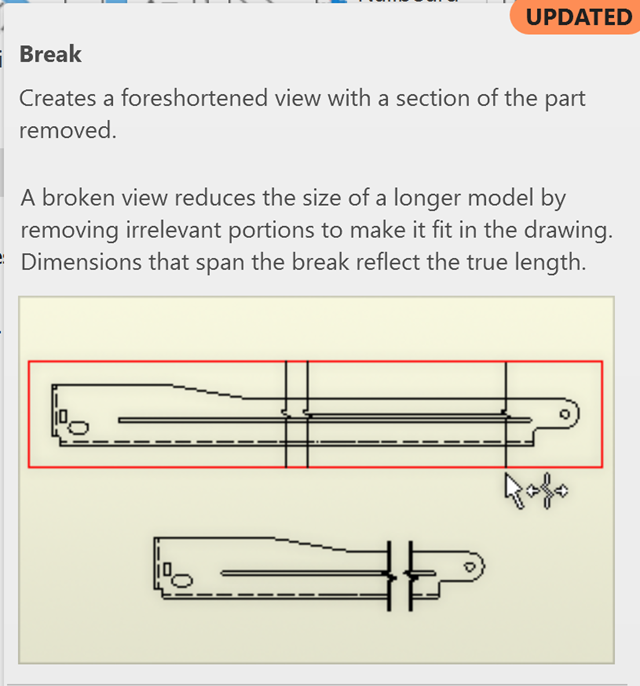
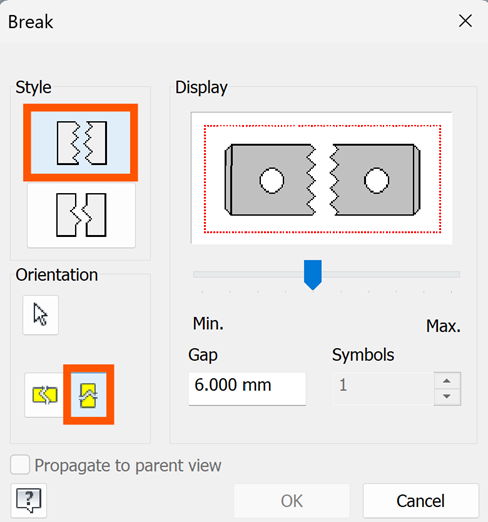
- Edge Selector: A new option has been added to the Orientation sector of the Break View dialog, allowing you to pick a model edge and automatically align the break accordingly. Each view supports a single break orientation, which must be defined when placing the initial broken view.
- Improved Annotation Control: Annotation tools have been upgraded to give users more precision and flexibility when placing dimensions, notes and symbols. Better control over placement and behaviours help maintain consistency across documentation sets.
- Annotation Enhancements for Slots: The Centre Mark command now supports slot features in 2D drawings. To apply centre marks, simply click on slot geometry to automatically place centrelines along the slot’s long axis. Slot centre mark formatting is customised through annotation styles, allowing control over line weight, type, and extension properties. This centre mark enhancement eliminates the need for manual centreline creation and works with the Automated Centrelines command.
- Slots in Hole Tables: The hole table now supports slot features. When enabled in your hole table style settings, slots will be included in the table with coordinates referencing the slot centre and a ‘Slot Note’ description.
- Centre Marks and Centrelines: Centre marks and centrelines are supported, including the option to use Dual-Axis Protection in Side View (default) or single centreline axis.
- Automated Centrelines: The Automated Centrelines command now supports slot features. When creating automated centrelines in drawing views, you can enable the ‘Slot Feature’ option to automatically generate centrelines for all slot geometries. This feature works with pre-configured slot countermark styles and supports various slot types including seats.
- Multi-Sheet Plotting Enhancements: Plotting across multiple drawing sheets is now more efficient and predictable. Engineers can manage batch outputs with improved control over sheet selection, order and output consistency.
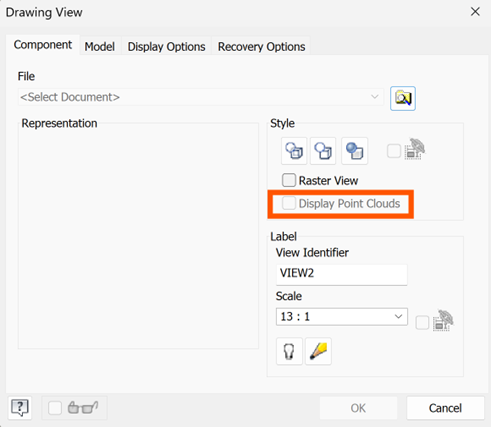
- Point Cloud Visibility in Drawings: One of the standout additions is the ability to view point cloud data directly within drawing environments. This bridges the gap between scanned real-world conditions and 2D documentation, improving accuracy in refurbishment, retrofit, and validation workflows.
These improvements may seem incremental, but together they significantly enhance one of the most critical outputs in engineering; the drawing set. With Autodesk Inventor 2027, teams benefit from:
- Faster and more stable drawing creation.
- Greater control over annotations and presentation.
- More efficient multi-sheet output workflows.
- Integration of real-world scan data into documentation.
The evolution of Inventor’s documentation tools reflects a clear priority: making drawings not just easier to produce, but more reliable and data rich.
By improving both traditional and annotation workflows and introducing point cloud visibility, Autodesk is strengthening the connection between digital models and physical reality.
Still got Questions?
Book Training
Our range of Autodesk Inventor training courses will teach you how to create production-ready parts and assemblies through hands-on learning experience. Make sure you contact us to find out which course is best for you.
Contact Us
We are here to ensure you receive a consistently high service and quality solutions for your business needs. We promise you won’t regret speaking to us, and if we can’t help you, we will try to find someone that can.