


The release of AutoCAD 2027 marks a major shift toward cloud-connected design workflows, especially with the integration of Autodesk Forma Data Management Essentials. Together, they form a more connected ecosystem where drafting, collaboration and project data management happen in sync, rather than in isolation.
What’s New in AutoCAD 2027 with Forma Integration?
AutoCAD 2027 introduces a built-in cloud collaboration through Forma Data Management Essentials, which is now included with standalone subscriptions of AutoCAD. Key capabilities include:
- Cloud-based DWG storage and version history.
- Folder-level permissions and access control.
- Multi-user markups and issue tracking.
- Parallel editing using checkout workflows.
- Connected References (smarter Xref management).
- Centralised support files and CAD standards.
This integration turns AutoCAD into a fully connected design environment rather than a standalone drafting tool.
To use Forma Data Management Essentials with AutoCAD, make sure to install the latest version of Desktop Connector. Desktop Connector enables AutoCAD to directly access Forma Data Management project drawings from the AutoCAD Start tab.
Before you start drafting, your project structure should live in the Forma Data Management environment. You can be invited to an existing project or create a cloud project.
Things to consider when setting up a cloud project in Forma Data Management Essentials:
- Start a new project inside of Forma Data Management Essentials.
- Assign a project name, discipline, and team members.
- Set your folder structure. This would be unique to each company.
Here is an example:
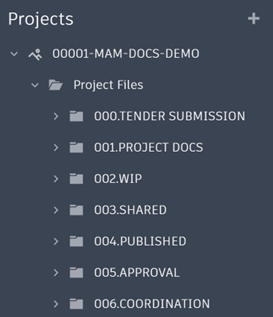
- Assign permissions.
This ensures your DWG files are no longer scattered across local drives or email chains.
Once your project is in Forma:
- Launch AutoCAD 2027.
- Sign in with your Autodesk Account.
- Navigate to the Forma Data Management project browser.
- Open DWG files directly from the cloud.
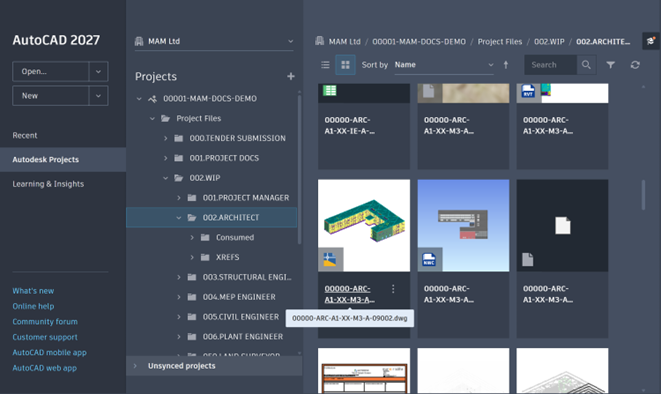
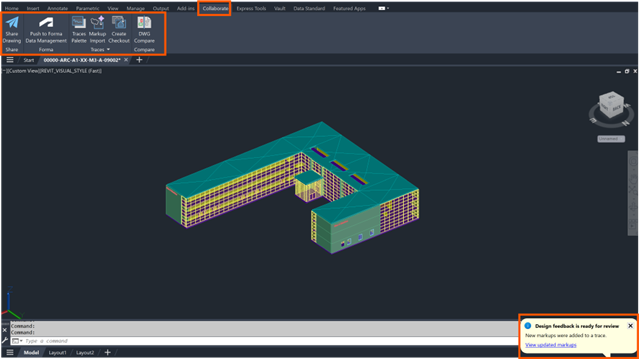
AutoCAD now automatically syncs file versions, so you always work on the latest approved drawing.
Using Checkout for Safe Parallel Work
One of the biggest workflow changes in AutoCAD 2027 is Checkout-based collaboration.
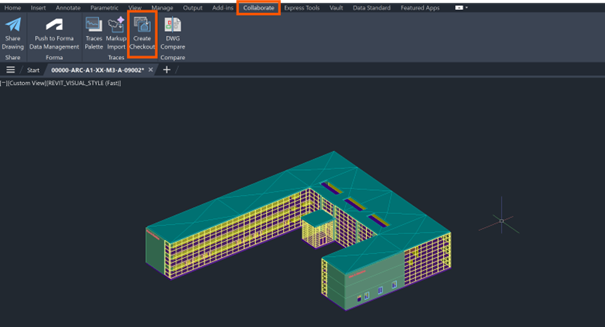
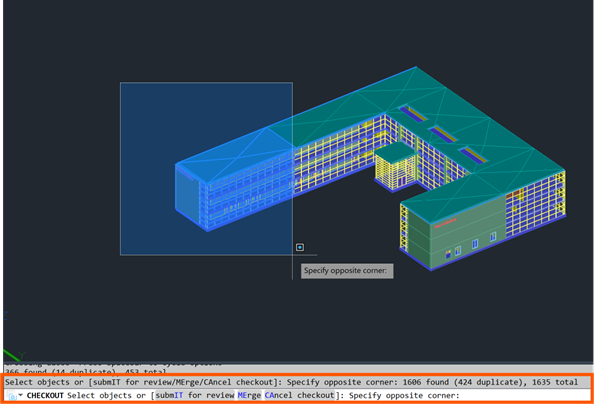

Instead of locking entire drawings:
- You check out only the geometry you need.
- Work in an isolated editing environment.
- Merge changes back into the central file.
This eliminates:
- File overwrites.
- Duplicate files.
- Blocking teammates from working simultaneously.
This system is designed specifically for cloud-managed DWGs in Forma Data Management.
Managing References with Connected References
Traditional Xref issues are significantly reduced.
- Missing references are auto-detected in the External References tool palette.
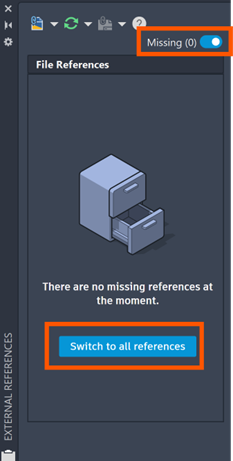
- AutoCAD suggests corrected file paths.
- Renamed or moved files can be repaired in one click.
This is especially useful in large teams where file paths change frequently.
Using Connected Support Files (Standards Control)
Forma Data Management Essentials introduces centralised control. Here is a list of the types of support files that can be configured and shared across Autodesk projects:
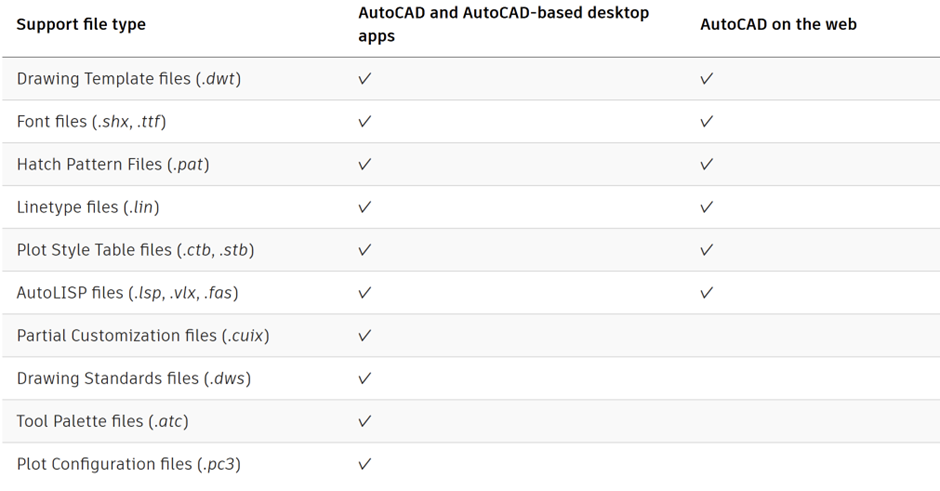
Instead of each user configuring AutoCAD locally:
- Standards are loaded automatically per project.
- CAD managers enforce consistency across teams.
This ensures every drawing follows the same setup without manual configuration.
Managing Issues and Markups
AutoCAD 2027 also integrates issue tracking:
- Create issues directly on DWG files.
- Assign them to team members.
- Track resolution status in real-time.
- Add multi-user markups in cloud view.
This replaces email based feedback loops with structured, traceable communication.
Conclusion
The integration of AutoCAD 2027 with Autodesk Forma Data Management Essentials represents a major shit toward cloud-native CAD workflows. Instead of treating drawings as isolated files, this system treats them as part of a managed, collaborative data environment. If adopted properly, teams gain:
- Cleaner collaboration.
- Fewer file conflicts.
- Stronger version control.
- Better design coordination.
In short, with the integration of Forma Data Management Essentials, AutoCAD 2027 is no longer just a drafting tool… It’s a connected platform powered by structured data management.
Still got Questions?
Book Training
We have developed a robust set of onboarding and deployment services to ensure best-in-class implementation of Autodesk Forma (formerly the Autodesk Construction Cloud).
Contact Us
We are here to ensure you receive a consistently high service and quality solutions for your business needs. We promise you won’t regret speaking to us, and if we can’t help you, we will try to find someone that can.