


Have you ever wondered how to flatten AutoCAD drawings?
Even though you may be working in 2D, AutoCAD is a 3D application with an X, Y and Z axis. Sometimes you may unwittingly place something with a Z value (Height) and from a 2D top down view your drawing may look fine but it isn’t.
Even though AutoCAD LT supports 3D, you can’t work in 3D in AutoCAD LT but objects can still have a Z value, especially if you have been sent a drawing created in full AutoCAD.
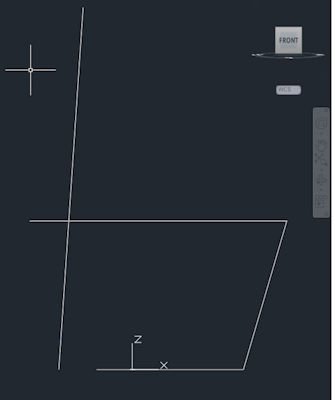
Figure 1: Front view of seemingly 2D drawing
So how can I check if I have anything with a Z value?
You have two options to check if you have anything that has a Z value:
- In full AutoCAD you can eyeball it. Using the view Cube select the front view, if you see anything above the rest of your drawing, you have placed something on the Z axis.
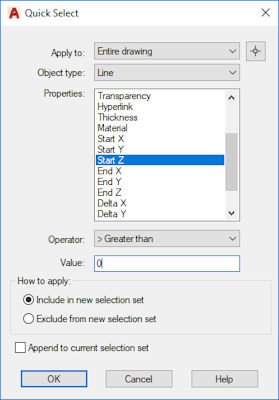
- Using the Quick Filter search for anything that has a Z axis value greater than 0. You may need to search both Start Z and End Z from the properties list.
I have 3D objects so how do I fatten my drawing back to 2D?
OK, so you have objects in your drawing which have a Z value. You want to make your drawing flat again with one simple command? Easy…
Making sure you’re in your top down view and select everything in your drawing (Ctrl+A).
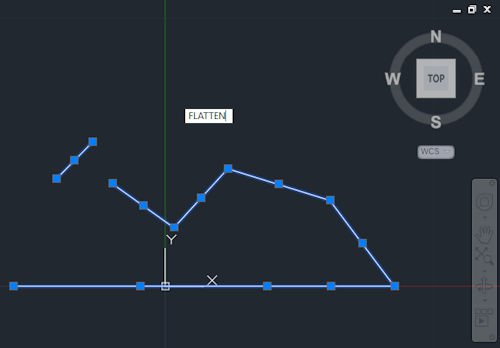
With everything selected use the command “FLATTEN”.
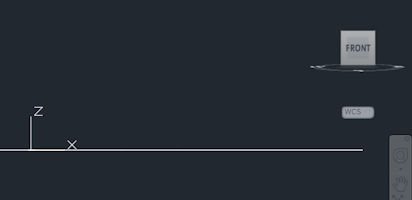
This will Flatten your drawing removing any Z axis values.
Conclusion
FLATTEN is a very useful command and is quick to use. Even if you don’t think you have any 3D objects, quickly selecting everything in the drawing and using the command Flatten is a good thing to do.
Its is also useful to use the OVERKILL command after FLATTEN to remove any duplicate lines that now exist in the same space.
Still got Questions?
Book Training
With our range of AutoCAD courses we can teach you best-in-class 2D and 3D design skills. This includes drawing, taking measurements, producing templates and everything required to create your designs.
Contact Us
We are here to ensure you receive a consistently high service and quality solutions for your business needs. We promise you won’t regret speaking to us, and if we can’t help you, we will try to find someone that can.