


How do you create and copy a standard project folder structure in Autodesk Vault?
This is a very quick win inside of Vault. Have you noticed that you can’t copy a folder with subfolders in Vault? This could be very useful if you like to keep a consistent folder structure for every project inside Vault.
Thankfully there is an easy solution/workaround which will allow you to do exactly this. Simply create the folder and all the subfolders in Windows. Once created, drag and drop that folder into the correct location inside Vault and voila there it is.
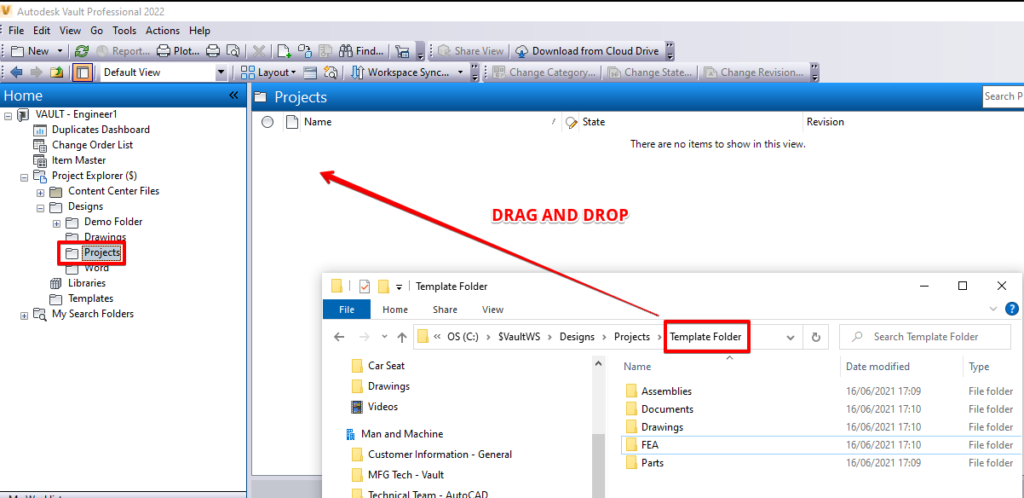
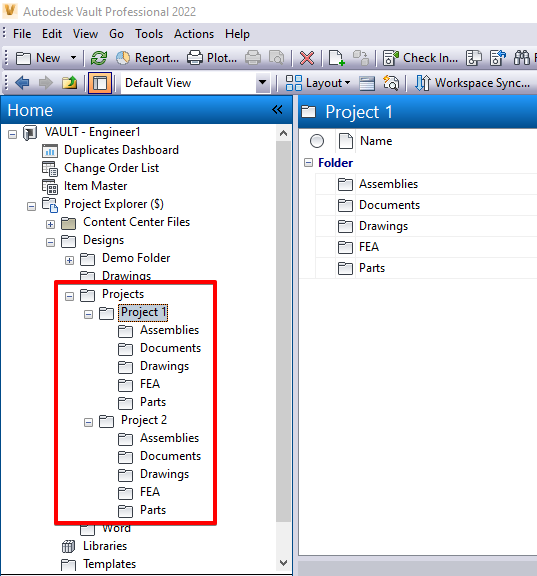
Vault will let you check in the folder and all the subfolders, then you can rename the project folder as required.
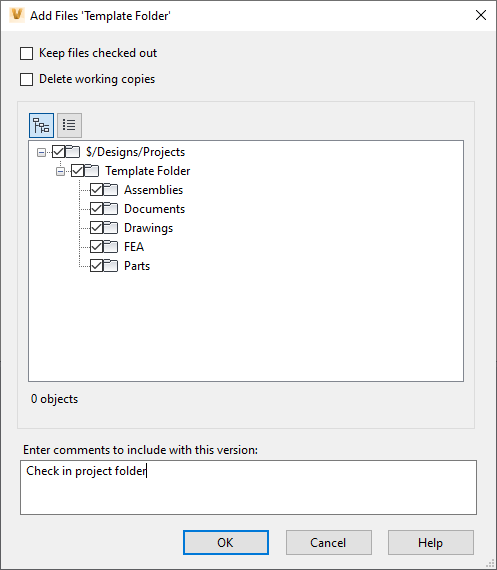
You can store the Windows folder away and use it when ever you need to create a new project folder in Vault.
Still got Questions?
Book Training
With our Autodesk Vault training you will learn to consolidate and organise all product information securely for easy reference, sharing and re-use. Make sure you contact us to find out which course is right for you.
Contact Us
We are here to ensure you receive a consistently high service and quality solutions for your business needs. We promise you won’t regret speaking to us, and if we can’t help you, we will try to find someone that can.