


Ever wanted your Autodesk software to return a Multiuser license if the software has been left open but unused?
Well, we can! Using an Options File we can specify a time limit for Multiuser licenses to be returned in the event the Autodesk software hasn’t been used for X amount of time. This can be useful if someone has forgotten to close the software and is hogging licenses.
How to Create a Timeout Options File
- Open notepad
- Type the line “TIMEOUT” followed by a space and in seconds, the maximum amount of time.
- Go to save and call the file “Options.OPT”
- Change the File type to “All Files”
- Save
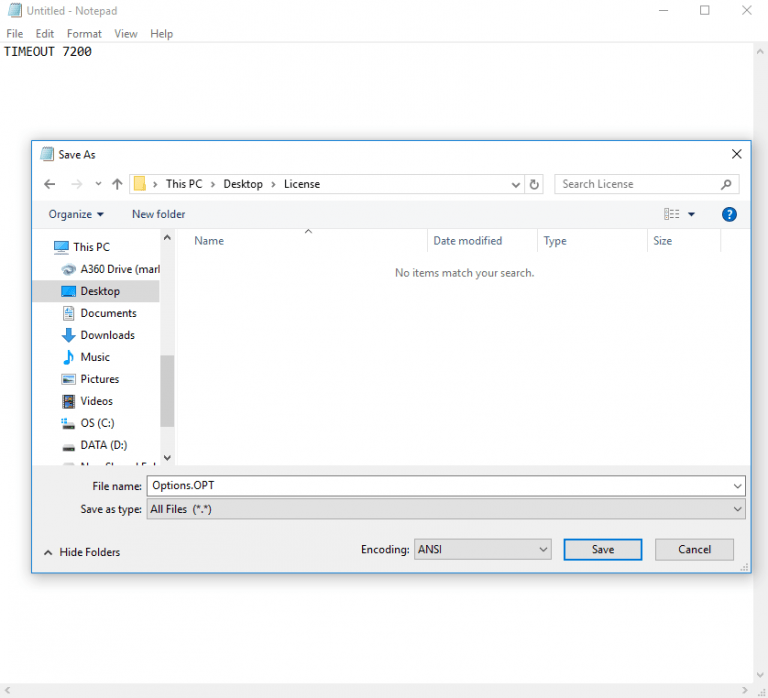
All that is left to do is place the Options File in the same location as the License file and restart your license server. Now, if anyone leaves their Autodesk software open and doesn’t use it, the license will be returned.
Please note that your Autodesk software will take a license back out if one is available when you return to your software.
Still got Questions?
Buy Software
Autodesk is a global leader in software for architects, builders, engineers, designers, manufacturers, 3D artists and production teams. Contact us now to find out which software is right for you.
Contact Us
We are here to ensure you receive a consistently high service and quality solutions for your business needs. We promise you won’t regret speaking to us, and if we can’t help you, we will try to find someone that can.