


One of the most practical enhancements in Autodesk Inventor 2027 is the introduction of a dedicated Slot tool, a small addition that makes a surprisingly big difference in everyday modelling workflows.
For mechanical designers, slots are everywhere; mounting holes, adjustability features, brackets, and assemblies. Until now, creating them often required multiple sketch steps, constraints, or workaround geometry. That changes in Inventor 2027.
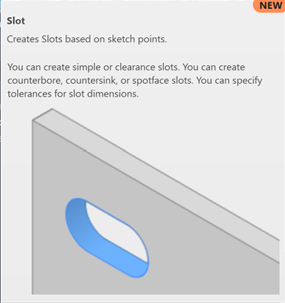
The new slot tool allows users to create slot geometry directly within a sketch environment, without relying on manual construction steps. Whether it’s straight, centre-to-centre, or tangent-driven, slots can now be defined more intuitively and consistently.
- Faster, more consistent geometry creation: Instead of building slots from arcs and lines manually, engineers can now generate precise slot features in a single operations. This improves both speed and accuracy whilst reducing the chance of sketch errors.
- Better design intent control: Because the slot tool is parameter driven, it’s easier to maintain design intent. Adjustments to length, width or position update predictably without breaking constraints or requiring sketch rework.
- Improved workflow efficiency in assemblies: Slots are often used in assemblies for motion or adjustment. By simplifying how they’re created at the part level, downstream assembly design becomes smoother and more predicatble.
On the surface, this is a small tool addition, but in practice it removes friction from one of the most repetitive modelling tasks in mechanical design.
There are 5 slot types available, split into Linear and Arc Slots.
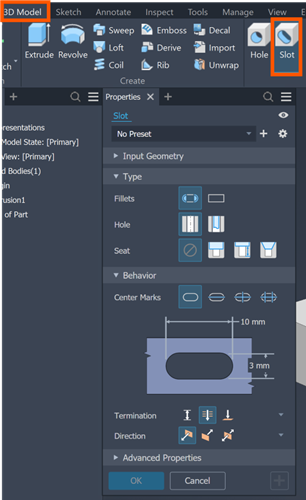
- Linear Slot Types
- Center to Center Slot – best for when you know the exact distance between arc centres.
- Overall Slot – best for when you know the total length of the slot.
- Centre Point Slot – best for when you want to place the slot from its midpoint.
- Arc Slot Types
- Three Point Arc Slot – creates a curved/arc-shaped slot.
- Centre Point Arc Slot – creates a curved slot defined from its arc centre.
With the new slot tool in Autodesk Inventor, engineering benefit from:
- Faster sketch creation.
- Reduced manual geometry construction.
- Improved design consistency.
- More efficient parametric control.
The introduction of a dedicated slot tool reflects a broader trend in Inventor’s evolution: streamlining everyday design tasks to reduce cognitive load and improve productivity.
It’s not just about new features, it’s about making familiar workflows feel more natural, efficient and reliable.
Still got Questions?
Book Training
Our range of Autodesk Inventor training courses will teach you how to create production-ready parts and assemblies through hands-on learning experience. Make sure you contact us to find out which course is best for you.
Contact Us
We are here to ensure you receive a consistently high service and quality solutions for your business needs. We promise you won’t regret speaking to us, and if we can’t help you, we will try to find someone that can.