


As design projects grow in complexity and teams become more distributed, managing external references (Xrefs) has long been one of the most frustrating aspects of working in AutoCAD. Broken links, missing files, and manually updating paths can slow down workflows and introduce costly errors.
With AutoCAD 2027, Autodesk introduces Connected References, a smart, cloud aware enhancement that significantly improves how Xrefs are handled. This feature isn’t just a minor upgrade, it represents a shift toward more intelligent, automated collaboration in CAD environments.
Connected References is a new feature designed to streamline the management of external references (Xrefs) – files that are linked to a drawing rather than embedded within it.
Traditionally if an Xref file was moved, renamed or stored in a different locations, AutoCAD would fail to locate it. Users then had to manually brose and reassign file paths, often across multiple references.
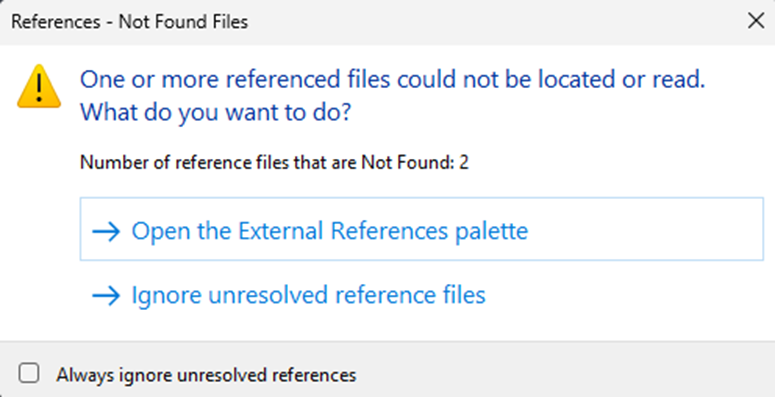
Connected References change this by:
- Detecting missing Xrefs automatically.
- Suggesting updated file paths.
- Allowing quick resolution directly within the interface.
In short, it reduces the friction of broken file links and keeps projects moving forward.
Missing References View
A new ‘Missing’ tool in the File References panel provides a dedicated view that shows only unresolved Xrefs.
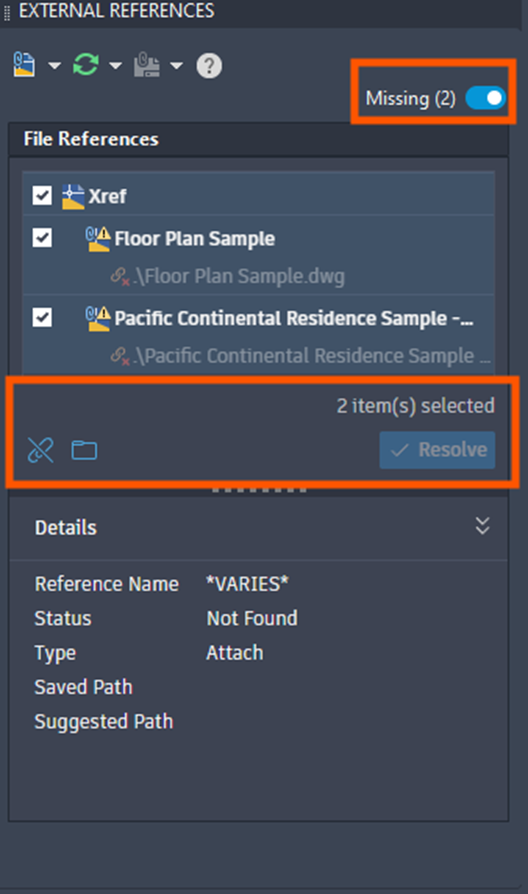
This makes it easier to:
- Identify broken references instantly.
- Focus only on what needs fixing.
- Avoid scanning through a cluttered list of files.
Smart Path Suggestions
One of the most powerful aspects of Connected References is its ability to automatically suggest new paths when references files are moved or renames.
When working with drawings stored in Autodesk’s cloud (Forma Data Management), AutoCAD can:
- Detect where a missing file has been relocated.
- Present a suggested path.
- Allow you to resolve the issue with a single click.
This eliminates repetitive manual searching and significantly reduces downtime.
Direct Actions from the Xref Panel
Users can now take immediate action on missing references without leaving the External References palette.
- Reassign file paths.
- Detach unnecessary references.
- Accept suggested fixes.
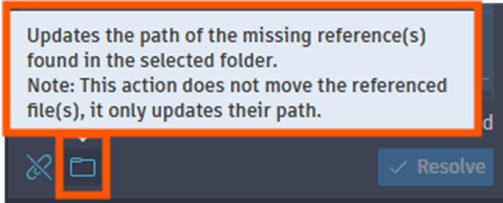
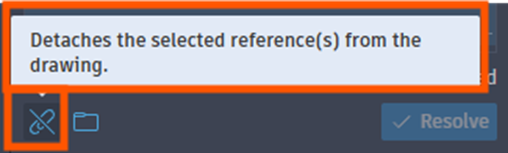
This centralised control improves efficiency and keeps workflows uninterrupted.
Cloud Integration with Forma Data Management
Connected References is tightly integrated with Autodesk’s cloud ecosystem particularly Forma Data Management. This integration enables:
- Better tracking of file versions.
- Automatic detection of renames or relocated files.
- Seamless collaboration across teams.
It also ensures that Xrefs remain intact even in dynamic, shared environments.
As well as all of the above, this enhancements also results in:
- Increased Productivity: Manual Xref repair can be time-consuming, especially in large projects with dozens of references. Connected References automates much of this process, allowing designers to focus on actual design work.
- Improved Collaboration: In team environments, files are frequently moved, renamed or reorganised. This feature ensures that everyone stays connected to the correct references, even as projects evolve.
- Reduced Errors: Missing or incorrect references can lead to incomplete drawings and costly mistakes. By proactively identifying and resolving these issues, Connected References improves overall drawing reliability.
Before vs After: A Quick Comparison
| Workflow Step | Before AutoCAD 2027 | With Connected References |
| Missing Xref detection | Manual, often overlooked | Automatic detection |
| Fixing broken paths | Manual browsing | Suggested paths + quick fix |
| Managing multiple Xrefs | Time-consuming | Centralised, filtered view |
| Collaboration impact | Frequent disruptions | Seamless cloud-based updates |
Real-World Impact
Imagine working on a large architectural project where multiple team members update references files daily. Previously, even a simple folder reorganisation could break dozens of Xrefs. With Connected References:
- AutoCAD detects the changes.
- Suggests the correct file location.
- Let’s you fix everything in seconds.
This transforms a tedious troubleshooting task into a nearly invisible process.
Connected References in AutoCAD 2027 is more than just a usability improvement, it’s a step toward intelligent, connected CAD workflows.
By combining automation, cloud integration, and smarter UI tools, Autodesk is addressing one of the most persistent pain points in CAD design. Whether you’re a solo designer or part of a large, distributed team, this feature helps ensure your drawings stay linked, accurate and up-to-date.
As AutoCAD continues to evolve, features like Connected References highlight a clear direction: less manual work, more intelligent assistance, and better collaboration across the board.
Still got Questions?
Book Training
With our range of AutoCAD courses we can teach you best-in-class 2D and 3D design skills. This includes drawing, taking measurements, producing templates and everything required to create your designs.
Contact Us
We are here to ensure you receive a consistently high service and quality solutions for your business needs. We promise you won’t regret speaking to us, and if we can’t help you, we will try to find someone that can.