


The July release of Autodesk Fusion brings with it another round of improvements to the home page. This is designed to speed up the file open and creation processes.
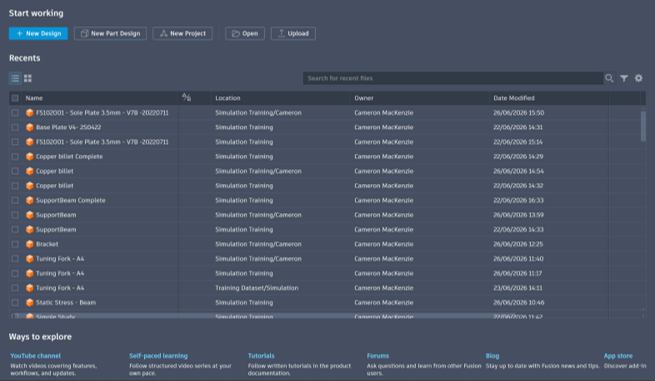
This updated further enhances the My Fusion view, setting a great base for further enhancements. The view not consists of three core sections; Start Working, Recents and Ways to Explore.
New action buttons are added to the top of the screen within a Start Working section for the creation of new designs, parts and projects, as well as the ability to quickly open or upload files.
Below this is the standard Recents section, available in a list or grid view.
The bottom of the page consists of the Ways to Explore section. This contains helpful links to tutorial files, self-paces learning and the app stope amongst others.
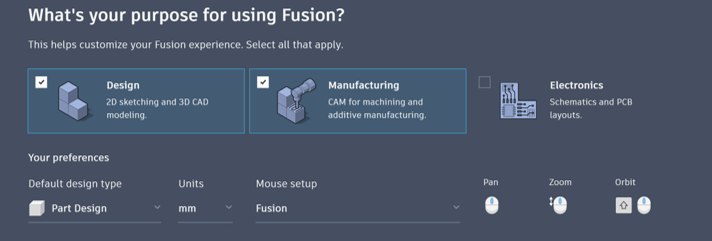
Your experience can also be customised by clicking the pencil icon in the top right. This will allow for configuration of frequently used workflows (Design, Manufacturing or Electronics) and system settings such as your default design type, units of measurement and mouse setup.
Still got Questions?
Book Training
Through hands-on exercises, you will acquire the key skills and knowledge required to design models using Fusion. It will teach you everything from product development to simulation and fabrication.
Contact Us
We are here to ensure you receive a consistently high service and quality solutions for your business needs. We promise you won’t regret speaking to us, and if we can’t help you, we will try to find someone that can.