


In modern CAD workflows, precision isn’t optional, it’s everything. Even minor geometric inconsistencies, like tiny gaps or misaligned lines, can ripple into major downstream issues – from failed joins to inaccurate measurements. With AutoCAD 2027, Autodesk tackles this long-standing challenge head-on through a powerful new feature: Geometry Cleanup.

Geometry Cleanup is a semi-automated tool designed to detect and resolve common drafting errors directly within your drawing. It scans selected objects and identifies issues such as:
- Gaps between elements.
- Overshoots and undershoots.
- Misaligned or incorrect angles.
Once detected, these issues are visually highlighted in the drawing workspace, making them easy to locate and fix.
Unlike traditional cleanup methods that rely heavily on manual inspection, this feature introduces a smarter, guided workflows that blends automation with use control.
How it works
The process is refreshingly simple:
- Launch the Geometry Cleanup palette: access it via the ribbon or by typing GEOMETRYCLEANUPOPEN).

- Select objects to scan: choose specific geometry or entire sections of your drawing. You’ll see the dialog when opening this for the first time.
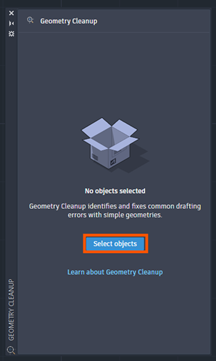
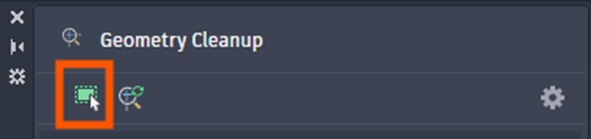
- Select object here next time the command is activated.
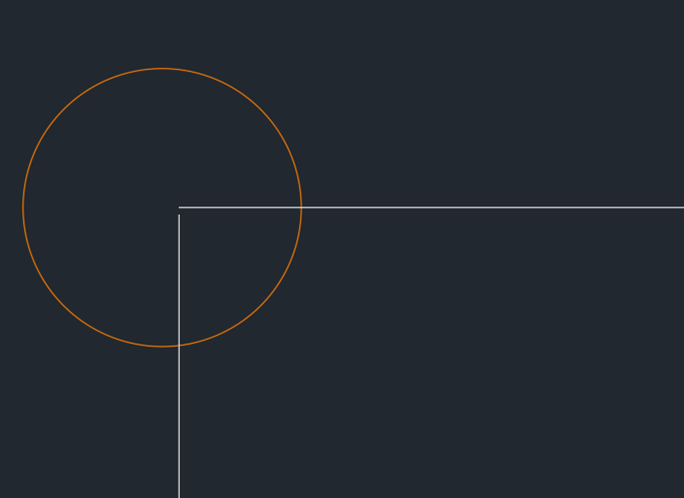
Example: This gap is what we want to identify.
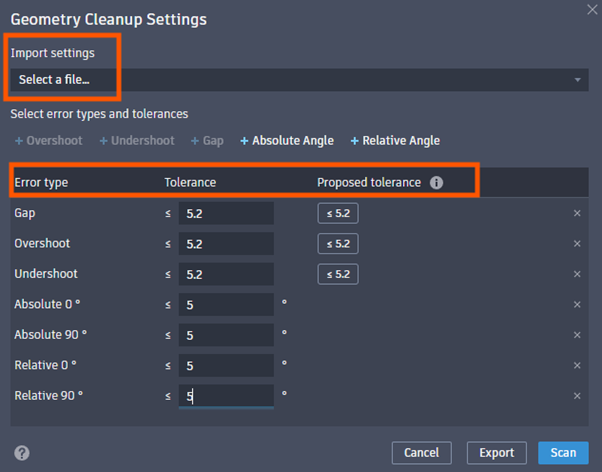
- Customise the detection settings: define error types and tolerance levels to control how strict the scan should be.
- Run the scan: the system analyses the geometry and flags potential issues.

- Review and fix errors: click through detected problems, preview suggested fixes in real-time, and apply the most appropriate correction, or ignore it if intentional.
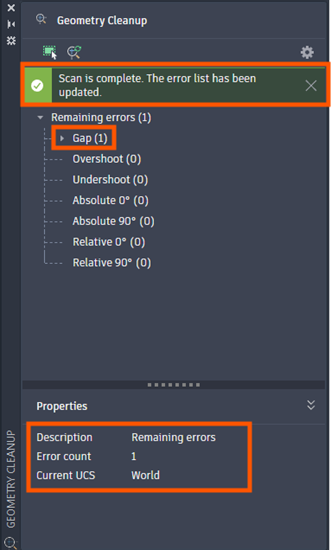
This interactive review process ensures that automation never overrides design intent.
Key Features
- Visual Error Highlighting: Errors are marked directly in the canvas, eliminating the guesswork. You can zoom to each issue instantly and understand its context.
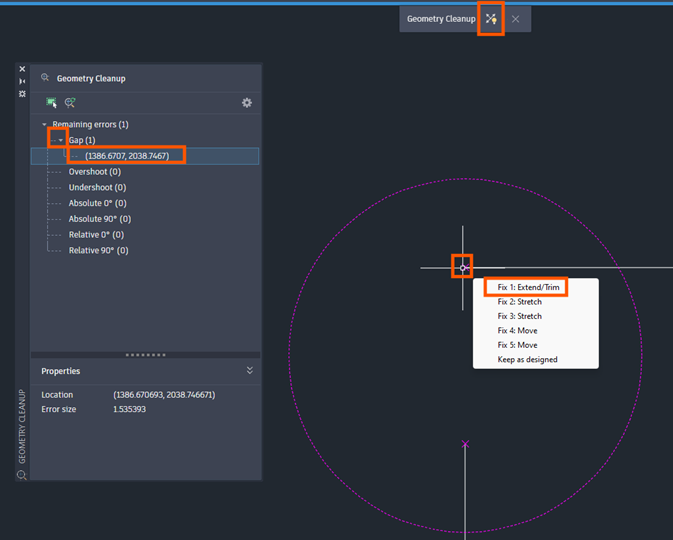
- Smart Fix Suggestions: For every detected error, AutoCAD proposes multiple correction options, such as trim, extend, move or rotate, allowing flexibility in how issues are resolved.
- Real-time Preview: Hovering over a fix shows a live preview before applying it, helping you make confident decisions without trial and error edits.
- Customisable Tolerances: Not all ‘errors’ are mistakes. Geometry cleanup lets you define tolerance thresholds ensuring that only relevant issues are flagged.
- Save and Reuse Settings: Export and reuse tolerance settings across projects, improving consistency in team workflows. Save tolerance settings as a *gcs file to import as needed.
Benefits of Using Geometry Cleanup to Multiply Producitivty
- Improved Accuracy: Eliminates subtle errors that can compromise design integrity.
- Faster Workflows: Reduces time spent on manual checking and fixing.
- Better Collaboration: Cleaner drawings mean fewer issues when sharing files across teams.
- Reliable Downstream Processes: Prevents errors in modelling, simulation or fabrication stages.
Autodesk emphasises that cleaner geometry leads to more reliable downstream workflows and significantly reduces manual cleanup effort.
Real-World Use Cases
- Architectural Drafting: Ensuring clean intersections between walls and structural elements.
- Mechanical Design: Fixing misaligned components before assembly modelling.
- Civil Engineering: Cleaning survey or imported data for accurate analysis.
- Legacy Drawing Updates: Quickly modernising older CAD files with inconsistent geometry.
The Geometry Cleanup feature in AutoCAD 2027 reflects a broader shift toward intelligent, assisted design tools. It doesn’t replace the designer; it enhances their ability to work faster and more accurately.
If you’ve ever spent hours chasing down tiny drafting errors, this feature alone may justify the upgrade. It’s a practical, well-executed addition that addresses a real pain point in everyday CAD work.
Still got Questions?
Book Training
With our range of AutoCAD courses we can teach you best-in-class 2D and 3D design skills. This includes drawing, taking measurements, producing templates and everything required to create your designs.
Contact Us
We are here to ensure you receive a consistently high service and quality solutions for your business needs. We promise you won’t regret speaking to us, and if we can’t help you, we will try to find someone that can.