


If you missed this one in the Autodesk Inventor Professional 2026.2 update, you must give it a try. You can now group parameters into custom names groups to help you organise all your parameters.
Let’s look at how to do this:
- Open an existing model that has parameters. Otherwise create a model and add some User Parameters.
- Open the Parameter dialog box.
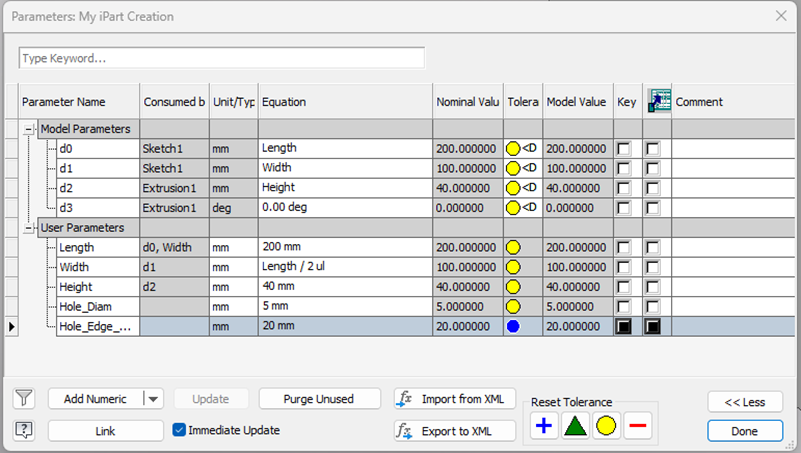
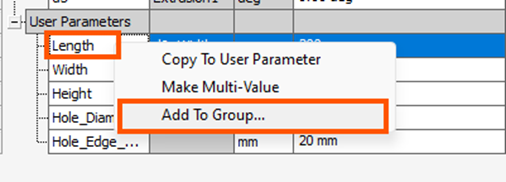
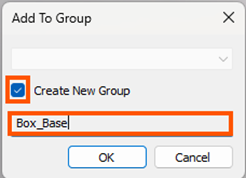
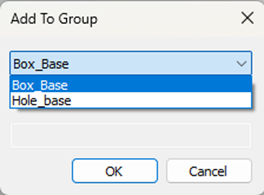
- To create a new group, right-click on the parameter name and select Add to Group. As this is the first time we are doing this, automatically Create New Group will be checked. Type a name for the group.
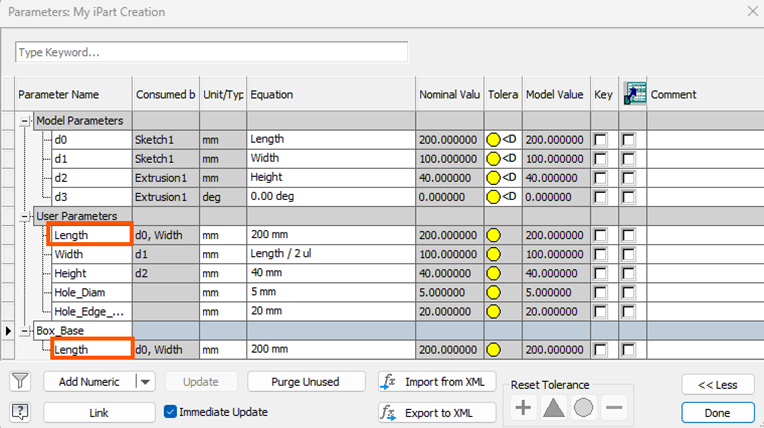
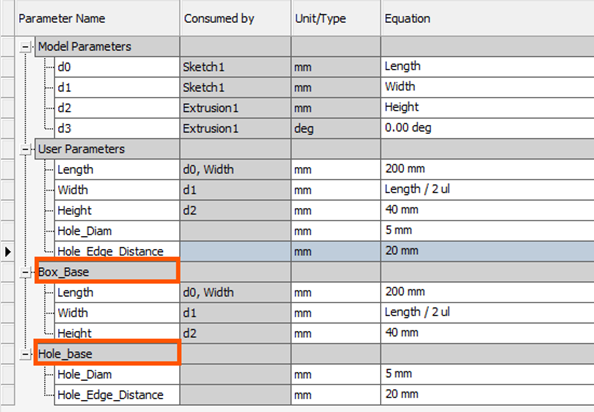
- Note that the parameters are shown in the group, but they are also still listed in the User/Model Parameters area. Groups just provide an easy way to find the parameters you need.
- You can continue to add the parameters to this group. Create another group if needed and add the parameters accordingly. Use the dropdown to select which group to add to after you have created more groups.
This is a great function to get super organised and find things quickly in an order!
Still got Questions?
Book Training
Our range of Autodesk Inventor training courses will teach you how to create production-ready parts and assemblies through hands-on learning experience. Make sure you contact us to find out which course is best for you.
Contact Us
We are here to ensure you receive a consistently high service and quality solutions for your business needs. We promise you won’t regret speaking to us, and if we can’t help you, we will try to find someone that can.