


You may have missed the Copy File Path function update in Autodesk Inventor Professional 2026.2 update which can save you a few clicks!
- When you start Autodesk Inventor, open an existing model or a drawing.
- Right click on the name of the file in the browser.
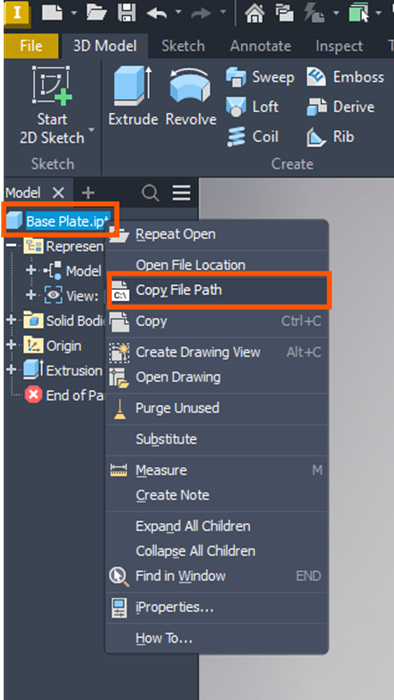
On the dropdown you will see ‘Copy File Path’. This function does exactly what it says and instantly copies the full file path of where the file is stored, making it easy to paste and share with other.
Before this function, we would have to use the Open File Location option above it, then go to File Explorer and paste the path in the address bar. This new option simplifies the process by cutting out a step.
Still got Questions?
Book Training
Our range of Autodesk Inventor training courses will teach you how to create production-ready parts and assemblies through hands-on learning experience. Make sure you contact us to find out which course is best for you.
Contact Us
We are here to ensure you receive a consistently high service and quality solutions for your business needs. We promise you won’t regret speaking to us, and if we can’t help you, we will try to find someone that can.