


Have you ever found yourself so caught up in daily workflows that you miss some of the handy tools AutoCAD has to offer? You’re not alone!
Each year, around April, Autodesk rolls out new updated to AutoCAD (and other Autodesk software), adding enhancements and features designed to improve your productivity. But with constant deadlines and tight schedules, it’s easy to overlook these new tools or updates that can make your work easier! This is exactly why ongoing training is so valuable, especially when it comes to discovering what’s new in each version!
Let’s rewind a bit and loot at a useful feature that’s been available for a while: Custom Workspaces in AutoCAD.
Create and Save your own Interface Layout
Imagine this scenario: you’re working on a drawing in the home tab, using tools from the draw and modify panels. Then you need to add some text so you switch over to the annotate tab. Once you’re done, you head back to the home tab and continue drawing… This back and forth is time-consuming.
But what if you could drag and drop the draw and modify panels from the home tab, directly into your drawing area, then switch to the annotate tab and still see all the tools you need?
Good news – you can!
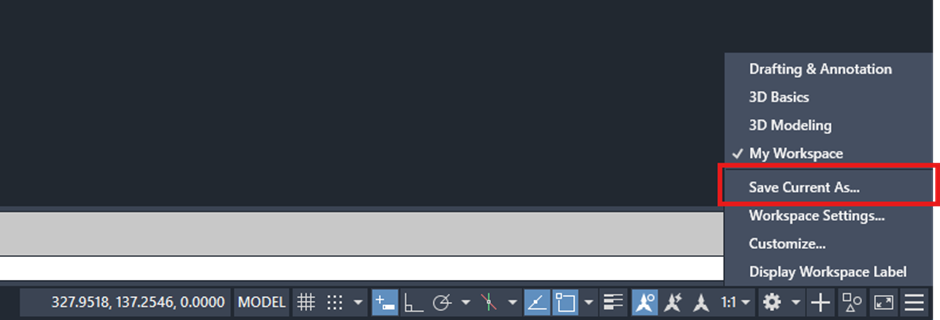
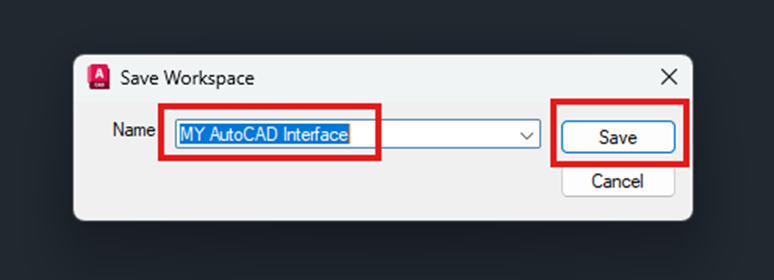
Better still, you can save this customised layout as a workspace, allowing you to return to it at anytime with a single click. You won’t lose the panels you’ve moved, they remain in your workspace until you choose to remove them. When you do, they automatically return to their original ribbon location.
- Default AutoCAD Interface showing home tab only:

- Modified workspace with draw and modify panels floating, whilst annotate tab is active:

- How to save a workspace:

Stay tunes for more tips on unlocking AutoCAD’s full potential. You might be surprised how many time-saving features are right at your fingertips!
Still got Questions?
Book Training
With our range of AutoCAD courses we can teach you best-in-class 2D and 3D design skills. This includes drawing, taking measurements, producing templates and everything required to create your designs.
Contact Us
We are here to ensure you receive a consistently high service and quality solutions for your business needs. We promise you won’t regret speaking to us, and if we can’t help you, we will try to find someone that can.