


With the release of the Fusion July update comes a much anticipated additions to the assembly toolset: Constrain Components.
Adding Constraints
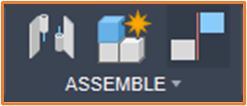
As with Joints, the Constraints will require two components within a multi-component or assembly design. The Constraint Components tool is located within the Assemble tab.

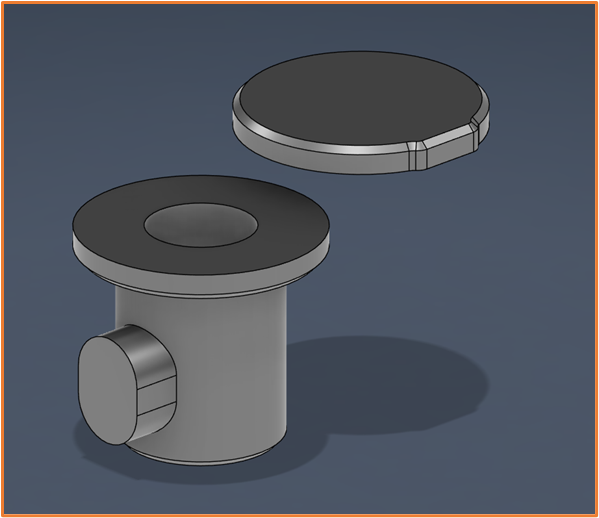
The Constraint tool will allow users to Align a set of Faces, Edges and Vertices in any combination. Giving more flexibility to the alignment of components in the Assembly. This differs from Joints which use a single Origin point of reference for each component. The Constraints tool also supports multiple relationships between the same two components, these are then added to the Constraint Set.
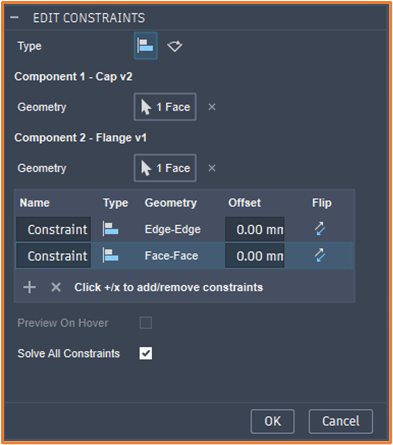

Managing Constraints
Once created, this will add the Constraint Set feature within the timeline, available for edit later in the design process.
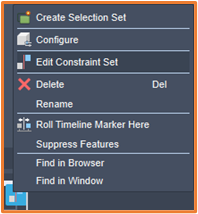
Keeping with Fusions UI philosophy, the Constraint tool is a lot more intuitive than most other programs. It really feels like an evolution on the way constraints should work in an assembly.
Due to the functionality Fusion have created within Joints, I don’t believe Constraints will fully replace them. I believe they serve different purposes in the assembly environment, meaning we now have two powerful tools at our disposal for Assemblies.
Still got Questions?
Book Training
Through hands-on exercises, you will acquire the key skills and knowledge required to design models using Fusion. It will teach you everything from product development to simulation and fabrication.
Contact Us
We are here to ensure you receive a consistently high service and quality solutions for your business needs. We promise you won’t regret speaking to us, and if we can’t help you, we will try to find someone that can.