


**Please note, as of 24th March 2026, the Autodesk Construction Cloud has joined the Forma industry cloud and has been rebranded as Forma. Find out more details here.**
Some of our users have experienced issues with how their PDF’s have been showing on their ACC portal. PDF’s appear to have printed correctly, and also appear correct when viewing from a PDF viewer but when published to ACC the formats show incorrectly.
This can happen to some PDF’s, but not all, so it appears very randomly.
The cause of this is a simple one, some PDF’s contain large Raster Parts (pixel graphics), images or logos for example. The ACC viewer will switch from Vector format to Raster when most of the PDF contains an image. This will cause the PDF to show differently, with thicker lines, or with chunkier graphics.
Try considering if you need the graphics in the PDF, this will ensure that the file will show in Vector format and will allow better performance of the file.
Another option you can try is to switch the format manually in the ACC viewer. Switch from ACC Viewer to the Browser PDF Viewer:
- Select the folder options (three dots) of the folder containing the PDF files
- Select ‘PDF Viewer Settings’
- Switch to the option ‘Browser’ (see picture to the right)
- Open the PDF again
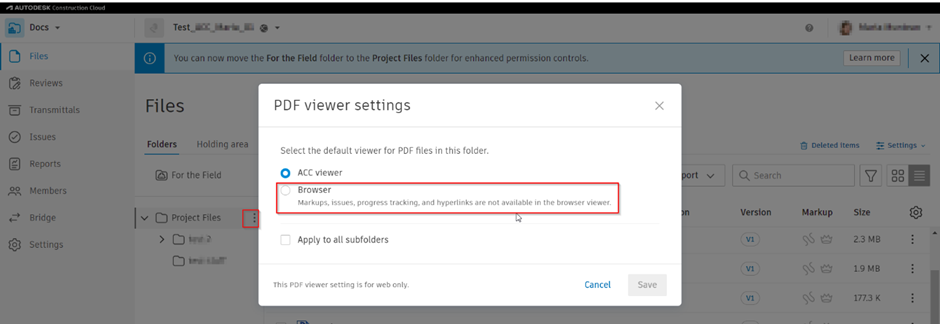
This will ensure the file views in the same format, so all PDF’s appear the same, and there are no graphic abnormalities withing the ACC.
Still got Questions?
Book Training
We have developed a robust set of onboarding and deployment services to ensure best-in-class implementation of Autodesk Forma (formerly the Autodesk Construction Cloud).
Contact Us
We are here to ensure you receive a consistently high service and quality solutions for your business needs. We promise you won’t regret speaking to us, and if we can’t help you, we will try to find someone that can.