


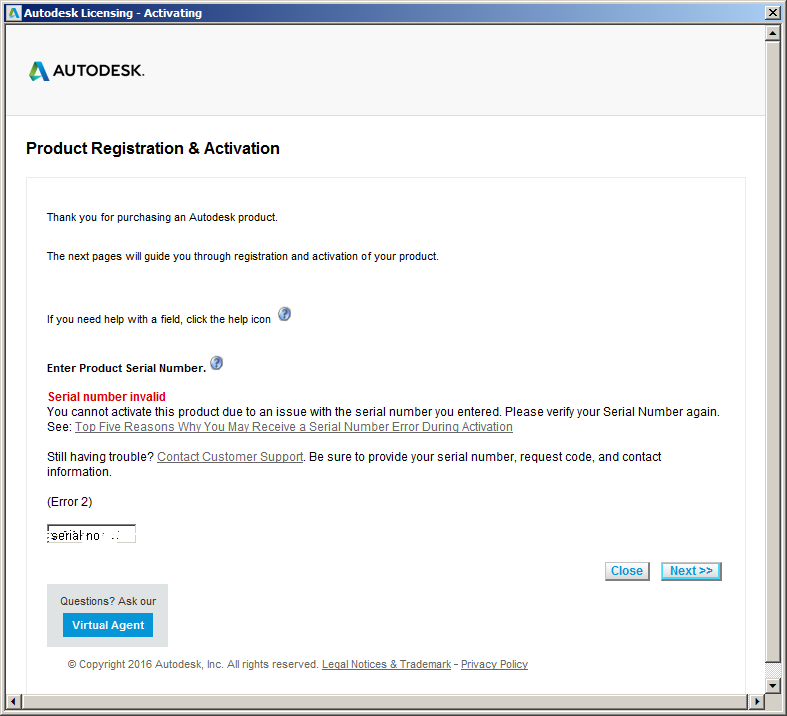
The Autodesk Invalid Serial Number Error is a known issue which occurs on a regular basis, so I am writing this blog to help you find your ideal solution.
The image shows the error we all despise. ‘Serial Number Invalid’. You attempt to enter your serial number given by your reseller (THE CORRECT ONE) and you still see the above, there could be several reasons why.
To begin, I will list below some of the known reasons we have seen this happen;
– Serial number may be different to the installation process you have followed (for example from an older suite install or a trial)
– The serial number entered is not Standalone, it is Network
– You have copied the serial number across and pasted it in the box (this on some occasions, annoyingly will not work)
– You have access to a newer release, and this serial number may be registered to a previous version
– Your subscription access is no longer available/ active
If you receive this error, please call us in the first instance and we can help you find your solution. Secondly please always check the serial number on your Autodesk Account https://accounts.autodesk.com. If you have a subscription license then please check this is still in date, and please always make sure you complete the installations from your active account and this error message should not appear.
(If for any reason your subscription license has changed/ expired/ switched, then a full uninstall and re-installation needs to complete before it will accept your new serial number).
Still got Questions?
Buy Software
Autodesk is a global leader in software for architects, builders, engineers, designers, manufacturers, 3D artists and production teams. Contact us now to find out which software is right for you.
Contact Us
We are here to ensure you receive a consistently high service and quality solutions for your business needs. We promise you won’t regret speaking to us, and if we can’t help you, we will try to find someone that can.