


Following the release of Autodesk Vault 2027.1, some users have reported an issue where files can be checking into Vault showing a file size of 0KB. Autodesk has confirmed that the issue was not present in the original 2027 release and is currently investigating the cause and a resolution.
The issue can occur when the AutodeskFSPool application pool is recycled while a file check-in is in progress. Autodesk also warns against manually recycling the application pool or resetting IIS while users are checking files into Vault. In some cases, additional files may appear as 0 KB minutes or even hours after the pool has been reset.
While Autodesk continues to investigate the issue, there is a workaround that can help prevent further files from being affected.
Disabling Automatic Recycling
Autodesk recommends disabling automatic recycling of the AutodeskFSPool application pool on your Vault server. To do this:
- On the Vault server, open Internet Information Services (IIS) Manager.
- In the Connections pane, expand the server name and select Application Pools.
- Select AutodeskFSPool, then click Advanced Settings in the Actions pane.
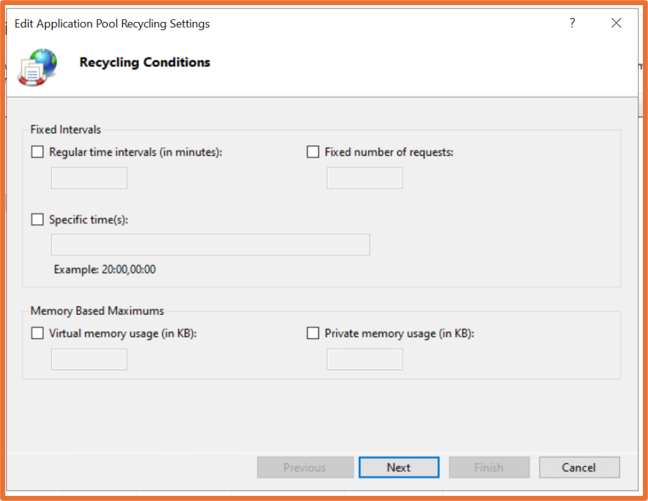
- Under Recycling, disable all checkboxes.
- Click Next, then disable On Demand and Configuration Changes.
- Click OK to save the settings.
Disabling recycling for configuration changes means that changes to web.config will no longer automatically trigger a recycle. An IIS reset will therefore be required when configuration changes need to be applied. This should only be carried out when no users are actively working in Vault or checking files in.
The files return showing 0kb when checking in Autodesk Vault 2027.1
Still got Questions?
Book Training
With our Autodesk Vault training you will learn to consolidate and organise all product information securely for easy reference, sharing and re-use. Make sure you contact us to find out which course is right for you.
Contact Us
We are here to ensure you receive a consistently high service and quality solutions for your business needs. We promise you won’t regret speaking to us, and if we can’t help you, we will try to find someone that can.