


The January 2025 update of Autodesk Fusion has brought with it a few new options in the Fusion CAM interface. When adding or editing toolpaths, within the Heights options of the dialogue, we have a new way of defining heights based on the top or bottom of geometry.
Whilst there were adjusted in 2024 to allow for Highest or Lowest of selected, this wasn’t always the easiest to use. The January 2025 update makes selecting these options much easier. With the previous highest/lowest of selection options, we could decide which featured we wanted to take into consideration such as Stock Top, Model Top and Fixture Top in highest of selected, or Stock Bottom, Model Bottom and Fixture Bottom in lowest of selected.
This left a gap where we may want to use the model bottom or fixture top as the bottom reference, or any other combination of tops and bottoms for that matter.
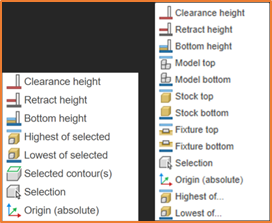
With this update, feature options are now individually available for selection. This is great for occasions where heights only require one reference. If heights need more conditions to be taken into consideration, the Highest of… or Lowest of… options are available.
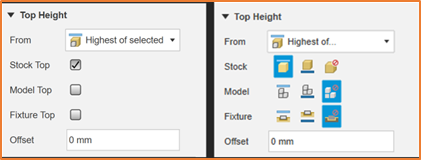
Within both of these, there is now an option against each feature (Stock, Model or Fixture), to use its Top, Bottom or Ignore, which makes for a much simpler selection process and should speed up the toolpath creation process.
Still got Questions?
Book Training
Through hands-on exercises, you will acquire the key skills and knowledge required to design models using Fusion. It will teach you everything from product development to simulation and fabrication.
Contact Us
We are here to ensure you receive a consistently high service and quality solutions for your business needs. We promise you won’t regret speaking to us, and if we can’t help you, we will try to find someone that can.