


With Autodesk’s latest update to Access (v 2.6), administrators now have the ability to control users installing and viewing product updates via registry keys. Depending on the requirements and what you’re after, you now have the following options:
- Users without install permissions: Users without permission who require administrative elevation can only update their products through Access.
- Users who should not install updates: You can prevent any user from installing updates or viewing available updates depending on preferences.
These features can be controlled through a variety of methods that can control registry keys such as Group Policy, Logon Scripts or any other management tool.
Disabling Updates
Navigate to HKCU/Software/Autodesk and create a new key named ODIS. Right click on the new ODIS folder and select DWORD (32-bit) Value with the following settings:
- Key name: DisableManualUpdateInstall
- DWORD Values@

1 – Users can open Access, however are unable to view any product updates.
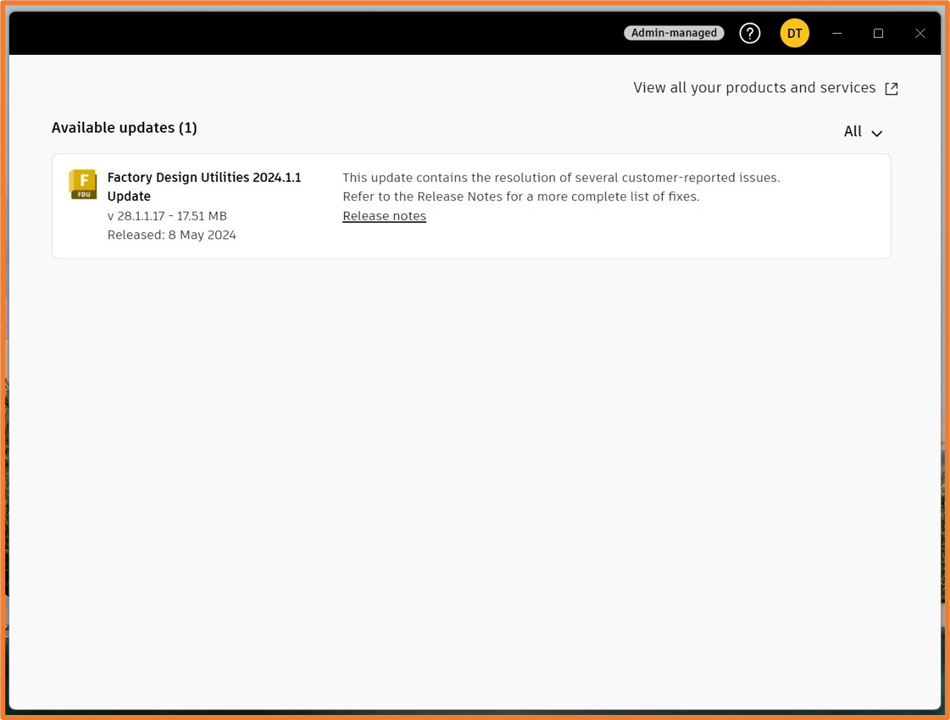
2 – Allows users to view available updates, however removes the ‘Update’ button.
Enabling Updates without Admin Permissions
Navigate to Registry Key and browse to HKLM/Software/Autodesk/ODIS. Right click on the ODIS folder and select DWORD (32-bit) with the following settings:
- Key name: AllowSystemContextInstall
- DWORD value: 1
Group Policy
If your company uses Group Policy, you can follow the below steps to distribute your selected keys to multiple users:
- Open the Group Policy Management Console, gpmc.msc
- Create a new (or edit an existing) Group Policy Object (GPO) in the Organisational Unit you prefer
- Expand the User Configuration section > Preferences > Windows Settings > Registry
- Right click on Registry, and select New > Registry Item
- Use these settings:
- Action: Update.
- Hive: HKEY_CURRENT_USER
- Key Path: Software\Autodesk\ODIS
- Value Name: DisableManualUpdateInstall
- Value Type: REG_DWORD
- Value Data: 1 or 2
Logon Script
If you use logon scripts, you can add the following command in any CMD-based script you have..
REG ADD HKCU\Software\Autodesk\ODIS /V DisableManualUpdateInstall /D 1 /T REG_DWORD
OR
REG ADD HKCU\Software\Autodesk\ODIS /V DisableManualUpdateInstall /D 2 /T REG_DWORD
Still got Questions?
Buy Software
Autodesk is a global leader in software for architects, builders, engineers, designers, manufacturers, 3D artists and production teams. Contact us now to find out which software is right for you.
Contact Us
We are here to ensure you receive a consistently high service and quality solutions for your business needs. We promise you won’t regret speaking to us, and if we can’t help you, we will try to find someone that can.