


One of Fusion CAM’s lesser known features is the ability to view various operation properties within the browser. This includes Tool Numbers, Operation Machining Time, Cycle Type and a few other values.
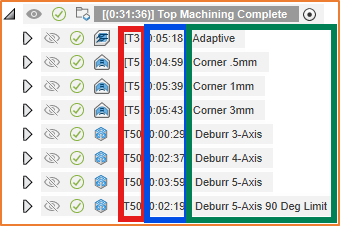
Red: Tool Number, Blue: Machining Time, Green: Operation Name
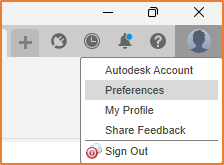
To set this up, select the User Profile button in the top right of the Fusion interface, and select Preferences.
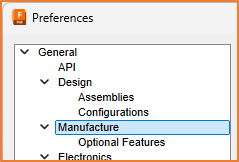
Once in the Preferences window, navigate to the Manufacture options within the left-hand panel.
The Browser Display Properties are available within this window, where you can tick any properties your would like to display within the browser.
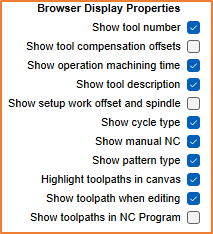
This will also display the total machining time of a setup within the browser. It is worth noting that this is an estimate based on cutting feed rates and speeds sets in each operation, it does not take into consideration tool changes or any movement between operations.
Still got Questions?
Book Training
Through hands-on exercises, you will acquire the key skills and knowledge required to design models using Fusion. It will teach you everything from product development to simulation and fabrication.
Contact Us
We are here to ensure you receive a consistently high service and quality solutions for your business needs. We promise you won’t regret speaking to us, and if we can’t help you, we will try to find someone that can.