


Issue
After drawing a model in AutoCAD, the text and dimension text disappears in your Paper space. This can cause a huge issue and will prevent any text or dimensions to be printed or shown in layout views.
Sometimes the drawing can appear broken, or the text can be distorted when you zoom in and out.
We see this issue repeatedly within the support team but this is something we can solve straight away using the details listed in the solution below;
Solution
When this happens, it is mostly due to a conflict with your video card and drivers, the first thing to check would be to turn off the ‘Hardware Acceleration’ button.
Having hardware acceleration turned on can improve performance, so this is always set by default.
To turn this off, enter GRAPHICSCONFIG into your command bar.
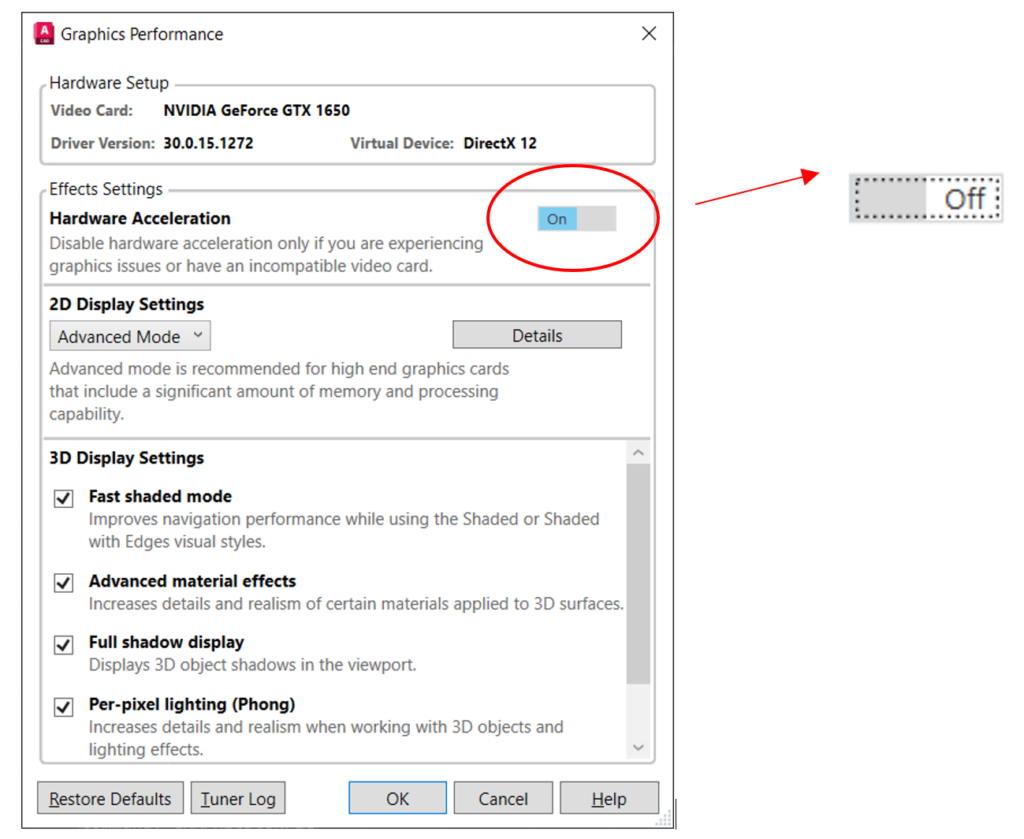
Toggle the highlighted button, until it shows OFF. You will now see your text appear within the layout area.
Still got Questions?
Book Training
With our range of AutoCAD courses we can teach you best-in-class 2D and 3D design skills. This includes drawing, taking measurements, producing templates and everything required to create your designs.
Contact Us
We are here to ensure you receive a consistently high service and quality solutions for your business needs. We promise you won’t regret speaking to us, and if we can’t help you, we will try to find someone that can.