


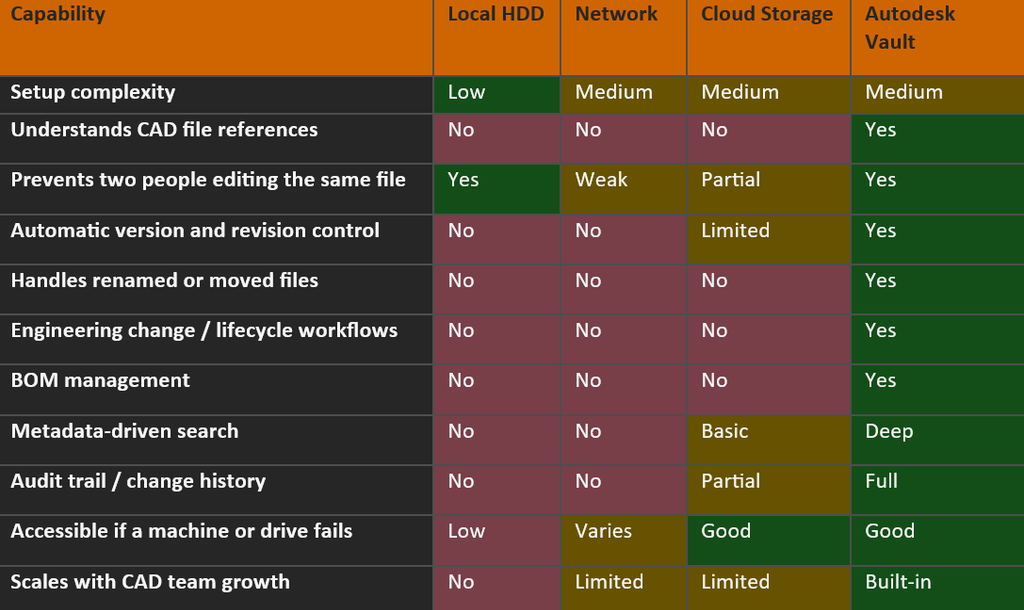
In this blog, we will be comparing the four places engineering teams most commonly end up storing their design data: local drives, a shared network drive, cloud storage such as SharePoint or Dropbox, and Autodesk Vault. The comparison matrix below looks at where each one genuinely holds up once CAD files are involved.
The Comparison Matrix
Key Takeaway:
General storage tools are relatively east to set up and start working on, however they lack the tools and functionality that engineering teams depend on. Only Autodesk Vault consistently manages the relationships, versions, workflows and audit trails that CAD teams depend on.
This comparison comes up constantly, usually for the same reason: whatever’s already sitting there – a local folder, a network share, a cloud storage account – feels like the path of least resistance because everyone already has access to it. For general documents, that’s often true. For CAD data specifically, it rarely stays true for long, and the reason isn’t obvious until you look at what these systems where actually built to manage.
Local Drives:
Almost every team started here, usually without ever deciding to. A designer saves files to their own machine because it’s fast and simple, and for a solo engineer or a very early-stage business, that’s genuinely fine – there’s no one else to conflict with. The problem isn’t the local drive itself, but that it never scales past the person who created it. The moment a second person needs that files to review it, build on it, or just find it whilst the original designer is on holiday. A local drive stops beings a storage solutions and starts being a bottleneck. It’s also the only option in this list with no build-in resilience: if that machine’s drive fails without a backup, the work isn’t just hard to find, it’s gone.
Network Shares:
For teams of one or two people working on simple, mostly independent part files, a network share can genuinely work for a while. The failure points in the table above tend to show up specifically once you introduce concurrent editing, cross-referenced assemblies, or a need to prove what changed and when.
Cloud Storage:
Cloud storage platforms are a real step up for accessibility and general file sharing, and syncing across locations and devices is genuinely useful for a distributed team. The gap is that these platforms sync files, not references. If you rename a part referenced by six assemblies, Google Drive, SharePoint or Dropbox has no way of knowing those six assemblies now need updating. It will happily sync the renamed file and leave the rest broken. Worse, if two people edit the same file offline and reconnect, most cloud storage tools resolve the conflict by creating a second copy of the file, rather than merging or blocking the change. While some solutions do offer simple versioning and audit trails, this functionality is often limited and was not created for CAD specific workflows.
Autodesk Vault:
Vault’s advantage isn’t that it has more features for the sake of it, it’s that its underlying model matched how CAD data actually behaves. Because it understands references natively, check-in/check-out, revision control, and search all work in terms of the actual assembly structure, not just individual files. That’s what allows things like automatic reference updates, BOM management, and lifecycle workflows to function reliably rather than needing constant manual maintenance.
Local drives, network shares, and cloud storage aren’t badly designed, they’re just designed for a different job, and most teams pass through all three in that order without really choosing to. The moment your data stops being a set of independent documents and becomes a web of linked CAD references, the tools built for general file storage start working against you instead of for you.
If any of the ‘No’ rows in that matrix are currently a live problem for your team, that’s usually the clearest sign it’s time to look at Vault properly rather than trying to patch the gap with more process. Please reach out and we can talk through your requirements.
Look out for my next blog post where I’ll be comparing the features of Vault Basic and Vault Professional – from the version control and secure file management you get in Vault Basic, through to the revision control, lifecycle workflows, change orders, BOM management, and ERP integration that come with Vault Professional.
Still got Questions?
Book Training
With our Autodesk Vault training you will learn to consolidate and organise all product information securely for easy reference, sharing and re-use. Make sure you contact us to find out which course is right for you.
Contact Us
We are here to ensure you receive a consistently high service and quality solutions for your business needs. We promise you won’t regret speaking to us, and if we can’t help you, we will try to find someone that can.