


When managing your licenses in your Autodesk portal, you may find you want to clean your estate and move licenses to different teams. Teams are a powerful asset, allowing you to divide licenses depending on how your company is organised.
Sometimes, you’ll want the ability to move licenses to another team. You can easily complete this, unless the product is cloud based. Some cloud-based products, (Fusion/Autodesk Construction Cloud Hubs), are linked to licenses within a team and moving these can cause a loss of access to your data. If you’re looking to move to cloud-based products, please do reach out to our support team and we can complete this on your behalf.
First, head into your management portal at https://manage.autodesk.com/home. Licenses can only be moved if users have not been assigned. If they have, you will need to unassign the licenses first.
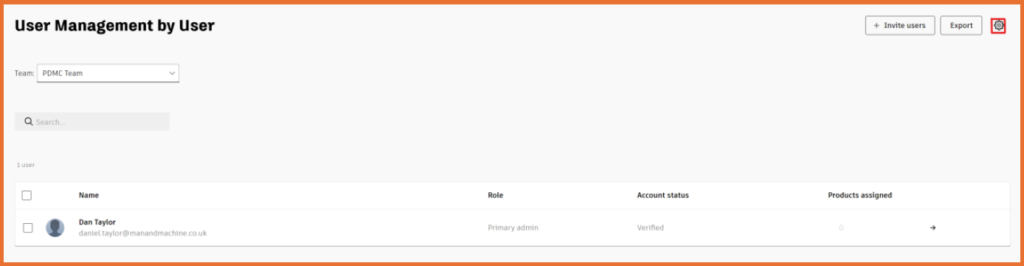
Next, head into the team you want to move the licenses to and select the settings icon in the top right corner:
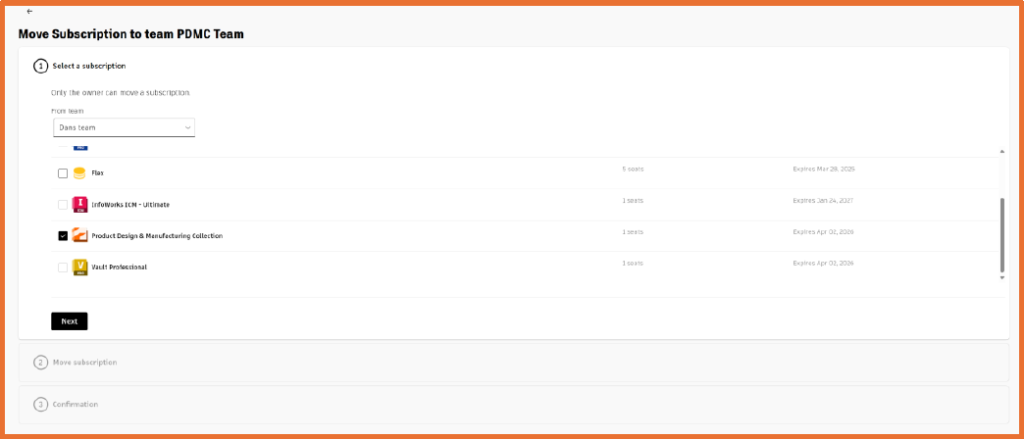
Navigate the dropdown and select ‘Move subscriptions to this team’:

Select the team you’re moving the licenses from, confirm the selection and you’ll find your license(s) have been moved.

Still got Questions?
Buy Software
Autodesk is a global leader in software for architects, builders, engineers, designers, manufacturers, 3D artists and production teams. Contact us now to find out which software is right for you.
Contact Us
We are here to ensure you receive a consistently high service and quality solutions for your business needs. We promise you won’t regret speaking to us, and if we can’t help you, we will try to find someone that can.