


Sometimes using AutoCAD can be a blessing and a curse, from the get go sometimes things that you think should be simple can be quite difficult. One of these conundrums presents itself in the form of editing the length of a line.
Lets say I want to edit a line and make a 1000mm line 500mm longer. The way to do it is to select the line, then select the node you want to extend from which will in turn allow you to enter the length you want to extend by.
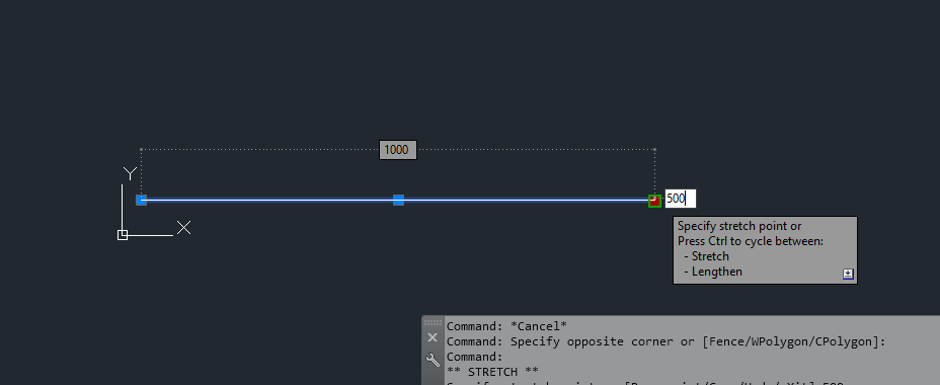
However, lets say that I want this line to be a 3000mm line. This is more useful when you have a line length that is hard to work out a combined length. So lets say I want a 1234mm Line to be a 3000mm line. Using the method above would be overly complicated. The best way to edit the line length is to follow the steps above but hit tab when you are about to change the length. This will allow you to change that temporary dimension over the top of the line.
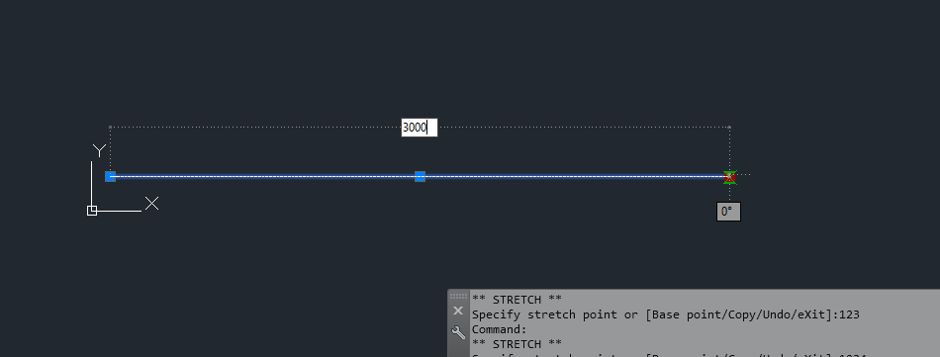
Simple but effective, Hopefully this helps you save a few hours over the course of your AutoCAD use life.
Still got Questions?
Book Training
With our range of AutoCAD courses we can teach you best-in-class 2D and 3D design skills. This includes drawing, taking measurements, producing templates and everything required to create your designs.
Contact Us
We are here to ensure you receive a consistently high service and quality solutions for your business needs. We promise you won’t regret speaking to us, and if we can’t help you, we will try to find someone that can.